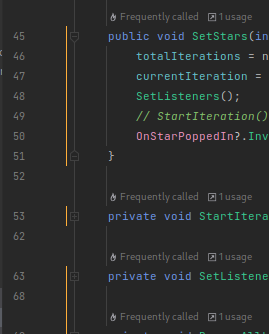
What are the yellow lines in the gutter? They are making my editor lag a lot.

Hello,
I've been noticing that my editor starts to lag a lot, to the point of it becoming very unusable, whenever these yellow lines are in my editor's gutter. It starts taking 1-2 seconds for intellisense to kick in, as well as my keystrokes to register.
Weirdly enough, the bigger these lines span, the slower the editor is. And when I fold the code having these lines, resulting in them getting relatively smaller in the gutter as well, the rider becomes better and becomes as responsive as it usually is whenever the code with these lines is out of view.
From my observation so far, it is somehow related to those functions which are resource intensive. As these lines are almost always there whenever I write a piece of code that rider identifies as a resource-intensive chunk.
Any clues for the cause or solution will be appreciated, Thank you very much :D
--------------------------------------------------------------------------
I am using rider along with Unity
OS: Arch Linux (Rider installed via Jetbrain Toolbox)
Processor: Intel Core i5 - 8265U
RAM: 20GB (I know. Very uncommon configuration)
Please sign in to leave a comment.
Hello,
looks like those lines are performance indicators, see this blog post and online help. If you navigate to Rider Settings | Languages & Frameworks | Unity Engine, what settings do you have in the C# | Enable performance analysis in frequently called code? Do you experience the same slowness if you disable this option completely or, when it's enabled, set Highlight performance critical contexts to Current method only?