File status colors and gutter lines are colored based on saving to disk, not on VCS changes

I recently upgraded to Rider 2023.1.1. In my previous version of Rider, I would see tab filenames and little bars on the gutter colored like so:
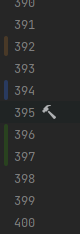
These would be colored based on the changes I've made to my local git branch. Now on Rider 2023.1.1, it's based on whether I have unsaved changes. As soon as I save to disk, all of the colored parts go away. How do I get back to the previous behavior, where it was colored based on the changes I've made to my local branch?
Update: I found the way to fix the colors in the gutter, by going to Settings | Version Control | git and checking "Enable staging area". However, the filenames still have the issue of only showing up blue when I have unsaved changes. As soon as I save that file to disk, the filename reverts to white. I want it to remain blue until I commit the changes in that file.
Update 2: Fixed it. For anyone else that runs into this issue, under Settings | Version Control | Directory Mappings I had it set to the directory of my project. By changing it to the <Project> option, that fixed the issue. I was also able to turn off "Enable staging area" once I did that.
Please sign in to leave a comment.