I want to change the color of the "Used in" highlight.

This post is converted from Japanese in Deepl, so some of the notations may not be correct.
I would like to change the color of the "Where Used" highlight.
For example, if it is "text search", I could change the color from the settings. However, I cannot find any item to change the color of the "Used" field in the settings, and the color is so light that it is very difficult to identify the part I want to look for.
Please sign in to leave a comment.
Hi!
There is Unused code setting in File | Settings | Editor | Color Scheme | General | Errors and warnings.
However, I'm not sure that I understood your question clearly. Please add screenshots with samples if this is not what you want. You can also write Japanese; our team will help with translation if necessary.
Thanks!
Thank you.
My point is not "Unused code setting".
If there is someone who understands Japanese, I would like to see Japanese support.
画面キャプチャを頂ければ幸いです。
また、カーソルをカラー文字列に置いてから Help -> Find Actions -> Jump to Colors and Fonts を検索してみてください。
役に立てますでしょうか。
Sorry, my reply is late.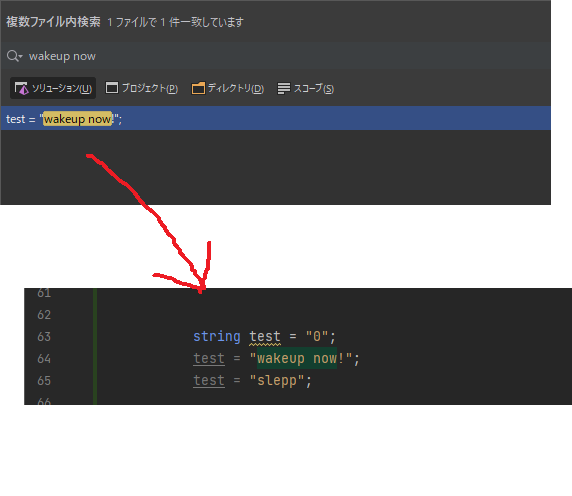
I would like to change these green highlights as they are hard to see.
Please try to change this option:
Excellent!
I have solved this problem!