BrowserStack SDK/Appium tests not running from Rider

I am using Rider IDE for development of Appium tests using C# and NUnit. I am also using BrowserStack SDK. I am unable to run tests directly from the IDE, only from the terminal.
I assume the issue is somewhere within the Rider IDE and it's configuration, since I can run tests directly from a different IDE, for example VS Code.
Does anyone know what could be the issue?
Note: This is BrowserStack's example code for BrowserStack SDK integration.
This is the error:System.ArgumentNullException : Value cannot be null. (Parameter 's')
TearDown : System.NullReferenceException : Object reference not set to an instance of an object.
at System.Int32.Parse(String s)
at WebDriverPatch.Prefix(Object& commandExecutor, ICapabilities& desiredCapabilities) in /Users/user/Desktop/nunit-appium-app-browserstack/android/obj/Debug/net6.0/BrowserStackPatch.cs:line 312
at OpenQA.Selenium.Remote.RemoteWebDriver..ctor(RemoteWebDriver this, ICommandExecutor commandExecutor, ICapabilities desiredCapabilities)
at OpenQA.Selenium.Appium.AppiumDriver`1..ctor(ICommandExecutor commandExecutor, ICapabilities appiumOptions)
at OpenQA.Selenium.Appium.AppiumDriver`1..ctor(Uri remoteAddress, ICapabilities appiumOptions, TimeSpan commandTimeout)
at OpenQA.Selenium.Appium.AppiumDriver`1..ctor(Uri remoteAddress, ICapabilities appiumOptions)
at OpenQA.Selenium.Appium.Android.AndroidDriver`1..ctor(Uri remoteAddress, DriverOptions driverOptions)
at BrowserStack.BrowserStackNUnitTest.Init() in /Users/user/Desktop/nunit-appium-app-browserstack/android/BrowserStackNUnitTest.cs:line 27
--TearDown
at BrowserStack.BrowserStackNUnitTest.Cleanup() in /Users/user/Desktop/nunit-appium-app-browserstack/android/BrowserStackNUnitTest.cs:line 33
Please sign in to leave a comment.
Hello,
I've managed to reproduce the same exception using both Rider and Visual Studio Code. Upon further investigation, it appears that the exception is thrown when the library code attempts to read a non-existing environment variable named
indexduring driver initialization (called fromBrowserStack.BrowserStackNUnitTest.Init()in the sample project).My guess is that for you, it works in VS Code because VS Code has this variable preconfigured. In Rider, you can pass additional environment variables to unit tests using
Settings | Build, Execution, Deployment | Unit Testing | Test Runner | Environment Variables.Let me know if this doesn't help.
Upon further investigation, we've discovered a workaround:
Settings | Build, Execution, Deployment | Unit Testing | VSTestThe only drawback is that in this case you will have duplicated tests in the session, like this:
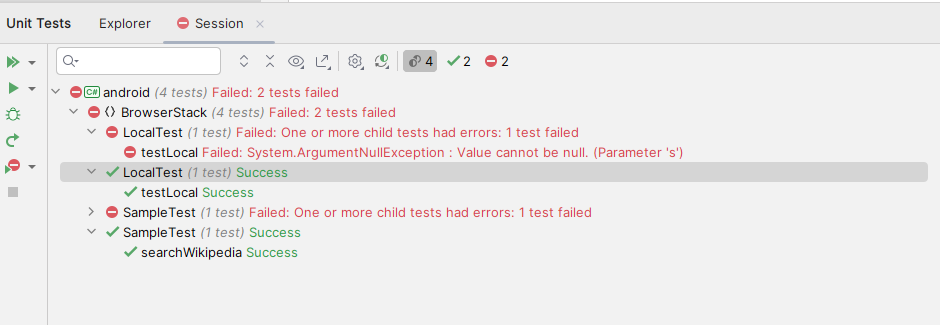
We're planning to investigate further, so please upvote the following issue and click
Watchto keep an eye on status updates: RIDER-104923 Support running BrowserStack Appium NUnit tests