[Rider] Entity Framework Core Tools UI dones not work on Ubutnu. "Could not execute because the specified command or file was not found"

The problem is that executing the command through "EF core UI" doesn't work. However, when launched in a normal terminal, it works.
- Rider Version: 2023.3.2
- Ubuntu Version: Ubuntu 22.04.3 LTS
- .NET Version: 7.0.14
- EF Version: 7.0.14

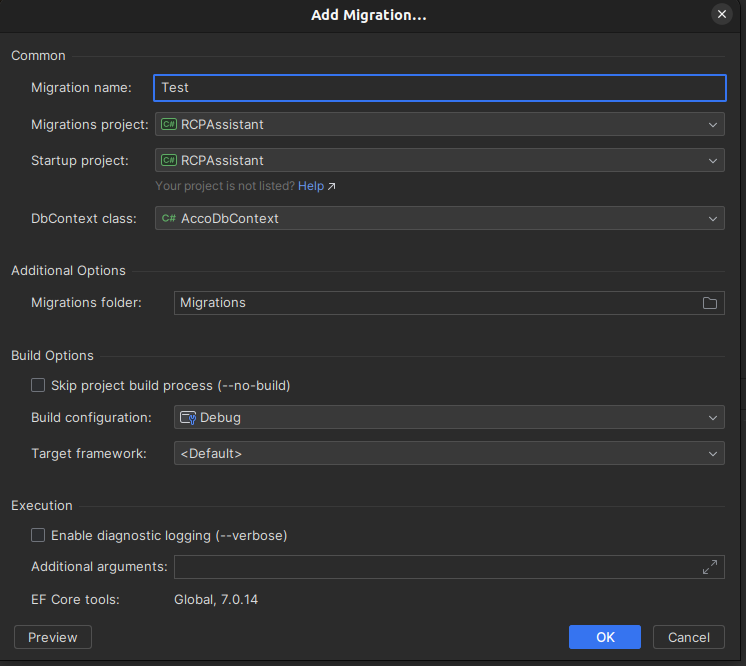

/home/mczaniecki/.dotnet/dotnet ef migrations add --project RCPAssistant/RCPAssistant.csproj --startup-project RCPAssistant/RCPAssistant.csproj --context RCPAssistant.Data.AccoDbContext --configuration Debug Test --output-dir Migrations
Could not execute because the specified command or file was not found.
Possible reasons for this include:
  * You misspelled a built-in dotnet command.
  * You intended to execute a .NET program, but dotnet-ef does not exist.
  * You intended to run a global tool, but a dotnet-prefixed executable with this name could not be found on the PATH.
[Normal terminal]
Of course, in the .bashrc shell I set the PATH for dotnet and insalled Microsoft.EntityFrameworkCore.Tools for the project.

I would be very grateful for your help and any tips to help me solve this problem.
Please sign in to leave a comment.
Could you try to execute
dotnet efcommand in Rider's console directly?Ensure you have dotnet tools environment variables added as mentioned in the plugin homepage.
Did you find any solution for this issue ?
Mohamed Amine Nafkha It could be an issue caused by the environment variables issue of Rider's environment. We have a corresponding thread for the problem on the plugin's repo. Please have a try with workaround mentioned in it, post your symptoms, and taken steps would be better.