Code folding is NOT working on a user control c# file

I have a project with a LARGE c# file that houses a usercontrol for a on-screen WinForms Grid. There are over 20000 lines of code in this file. The project has a number of WinForms files that all work fine but the code folding options when this c# file is in the editor do NOTHING and no errors of any kind are shown. Rider just does nothing.
Incidentally the WinForms designer crashes as well on this file and I have to turn the designer off. The project otherwise compiles and runs just fine. In Rider as well as VS2019 or VS2022 (Where folding and the designer on either VS version work as expected)
Anyone have any ideas?.
I have read and tried all of the applicable other tips in these forms having to do with code folding and deactivating or re-activating the WinForms designer
Please sign in to leave a comment.
Hello,
Thank you for contacting Rider support.
We are sorry to hear that you have run into such a problem.
Would you mind sharing IDE logs with us, so that we can take a deeper look at the issue?
Thank you in advance and have a nice day!
Done
Upload ID
2024_01_11_hrdbQPeZegm95MhPdq7z31
Thank you!
I see Rider fails to parse the TAIGridControl.cs file. That one is the problematic one, right?
Specifically, it fails on line 3031 (3031-3042 lines as per the logs).
Would it be possible to share any of the following? (the higher is better)
Please use the same method (upload service) of upload (so that only JB employee can access to these files);
Additional note:
Would you mind sharing a full-screen screenshot of Rider with problematic file (where you can't fold the text) opened?
As the project is on my GitHub publicly it can be had at
https://github.com/Harlock123/TAIGridControlDLL.git
And you can open that cs file in its entirety
Thats the same file that has the folding issues (There are some other forms in that project that do NOT have that problem so perhaps both problems are related to the parse issue you noted…
Hello Harlock,
Thank you for sharing the project.
Folding doesn't work
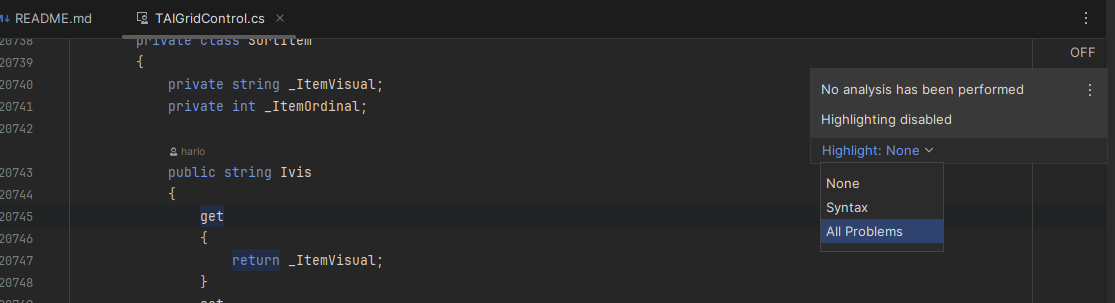
Do you have code highlighting in the problematic .cs file? If it is not complete (you see only a couple of colors, as in the screenshot below), please try switching the analysis on, as shown in the screenshot. Note: you will need to wait for several seconds before Rider analyses the whole file:
If the file is highlighted fine (as in the next screenshot), but you have no folding options, please tell me.
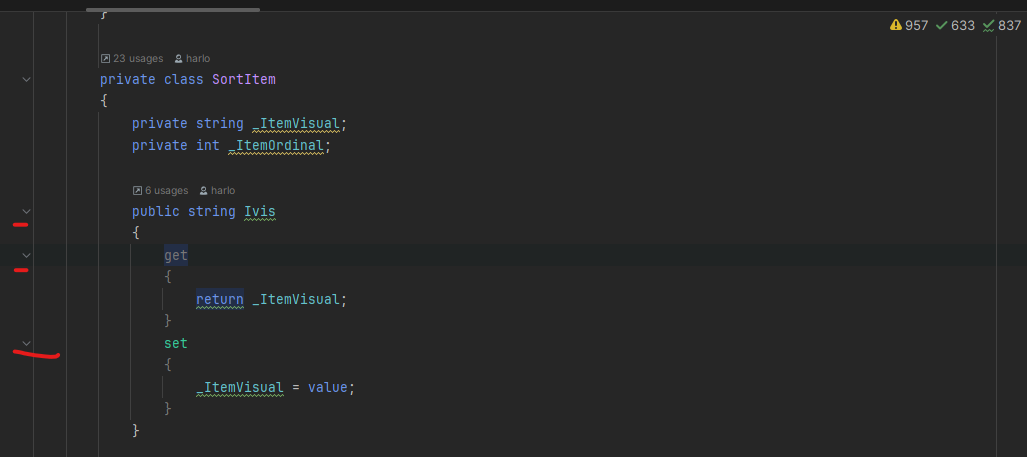
Explanation for this: Rider suspends code analysis in large files for performance reasons. Due to this, code folding is by default not available in such files. If missing a folding option in that scenario disturbs you, you are welcome to upvote this issue: Support code folding when analysis is disabled on document (due to file size threshold).
Designer fails to load a form
I reproduced the issue and reported it to our tracker: Designer fails to load a form. A developer will take a look. Please follow the issue page for further updates regarding this issue. At the moment I have no workaround to suggest, regrettably.
Have a nice day!