Cannot Deploy Azure Function App

I have an Azure Functions App written in .NET 8 using the Isolated model. Using visual studio and the azure portal I have previously successfully deployed this function app. But now I want to use Rider to deploy the function app but this does not work.
I have the Azure Extension installed. I have logged in and selected all subscriptions.
If I right click the function project and select Publish then Azure I see this:
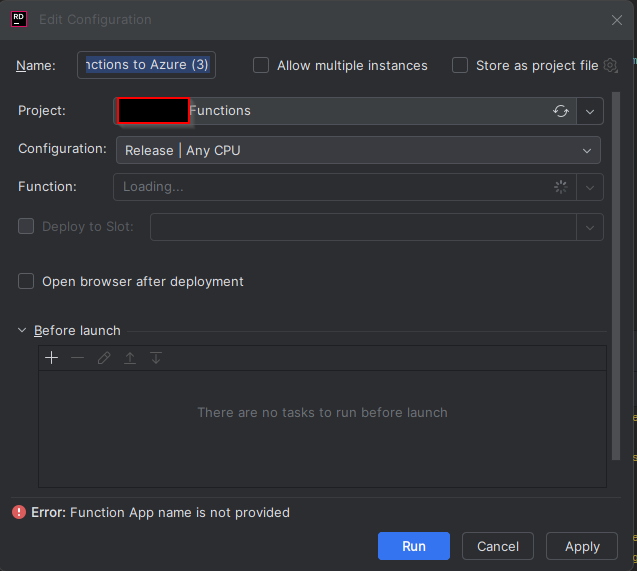
It then spends an eternity attempting to load the list of functions, before giving up and only giving me the option to create a new function app. Which I do not want to do.
I do not believe this can be any kind of local permissions error because I have no issues when publishing with visual studio.
Please sign in to leave a comment.
Hey Robert,
Thanks for contacting Rider support. I'm glad to work with you on this ticket.
Regarding this issue, I would first suggest you check the network connectivity from Rider:
1. Go to Rider Settings | Appearance & Behavior | System Settings | HTTP Proxy
2. Click "Check connection" button and test connection to “https://management.azure.com”:
If no issues, please collect HTTP network trace using Fiddler.
1. Download and install Fiddler (Fiddler Classic):http://www.telerik.com/download/fiddler
2. Launch fiddler and choose “Tools” -> “Clean Wininet cache”, then go to “Tools” menu -> “Options” -> HTTPS tab -> enable “Decrypt HTTPS Traffic” ->select “…from all processes” in the dropdown list.
3. Go to Rider Settings | Appearance & Behavior | System Settings | HTTP Proxy, set Proxy to Fiddler local proxy:
localhost:88884. Restart Rider and reproduce the issue.
5. In Fiddler, go to File -> Save -> All Sessions and save the trace to local machine.
6. Upload the trace to the Upload Service (https://uploads.jetbrains.com/) and let me know the Upload ID.
Thanks,
Tom
Hi Tom,
When I test the proxy connection I get “Request failed with status code 400”.
Hey Robert,
400 is expected response. Please go ahead to collect Fiddler trace. I will investigate this further once I receive the trace.
Regards,
Tom
Hi Tom,
The upload ID is ‘2025_04_07_2xf5jBm8RfcJjn4L5RV2vb’
Hi Robert,
Thanks for the log. Unfortunately, the Fiddler trace is not decrypted, so not valid to analyze the issue. Please confirm if “Decrypt HTTPS Traffic” option is enabled in Fiddler:
Additionally, while reproducing the issue, please follow steps below to enable tracing for Rider and collect Rider logs as well.
Hi Tom,
Sorry for the late reply.
I've uploaded it all under ‘Upload id: 2025_05_07_SeeA2FDQrMfSBntgcBCkhm (files: rider-azure-trace.saz and 2 more)’
Best regards,
Robert
Hello Robert,
Thanks for the logs. There are no HTTP requests getting access token in Fiddler trace. Then I checked the logs and found the exception below occurred while Rider was trying to fetch token:
-----------------------------------------------
2025-05-07 09:32:50,569 [ 178229] SEVERE - com.azure.core.implementation.AccessTokenCache - {"az.sdk.message":"Failed to acquire a new access token.","exception":"execute Azure Cli command 'az account get-access-token --resource https://management.core.windows.net/ -t <TenantID> --output json' failed due to error: Process exited with an error: 1 (Exit value: 1)."}
-----------------------------------------------
When you log in Azure in Rider, did you choose “Azure CLI” as authentication method? Please check the following to narrow down the issue.
az account get-access-token --resource https://management.core.windows.net/ -t <TenantID> --verbose --output jsonIf the issue persists and no clue, please upload the complete output of “
az account get-access-token” command.Regards,
Tom
Hi Tom,
I logged out and signed in with OAuth and that fixed the issue.
Thanks for all your help!
Robert