C# - Red (down)/Green (up) arrows in autocomplete suggestions - what do they mean

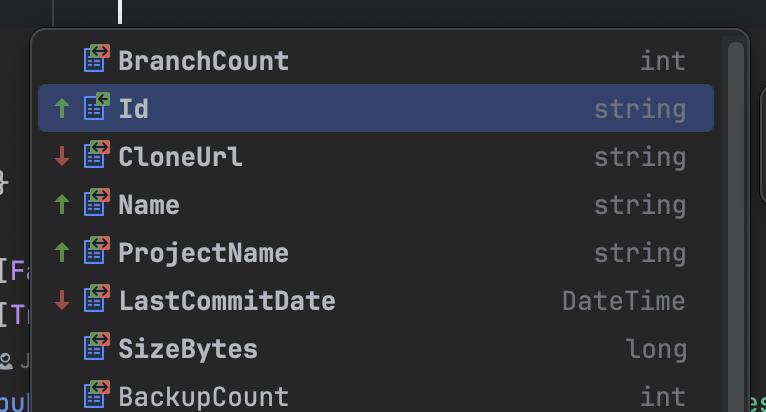
So I was using autocomplete on object initialisation in one of my projects today and noticed the up and down arrows in front of property names. Does anyone have any idea what they mean, they seem random.
Please sign in to leave a comment.
Hello Jacob,
I've never seen such icons before. As a test, could you please disable all downloaded plugins to check if this is from some plugin?
Let me know if it still appears. I will then research further.
Thanks,
Tom
Hi Tom,
Must be noted of course that it's not too important, I'm just very curious about the meaning/origin.
With all plugins disabled it still shows up, the arrows are new to me as well. Extra info from ‘about rider’ (after updating today to 2025.2.0.1 it still shows up, downgrading to older versions make the arrows go away):
Theme: Dark
Color scheme: Rider Dark Theme Default
It seems quite random as well to me, as seen in the examples I've posted below.
Shows up in versions:
- JetBrains Rider 2025.2.0.1 Build #RD-252.23892.537, built on August 20, 2025
- JetBrains Rider 2025.2 Build #RD-252.23892.524, built on August 12, 2025
Doesn't show up in versions
- JetBrains Rider 2025.1.6 Build #RD-251.27812.115, built on August 12, 2025
- JetBrains Rider 2024.3.8 Build #RD-243.26574.73, built on May 18, 2025
Thanks,
Jacob
Hello Jacob,
Thanks for the additional details. With further research, it turns out this feature comes from bundled "Machine Learning Code Completion" plugin, which is used to reorder elements in the completion popup by ranking more relevant items higher using machine learning.
The arrow marks are used to indicate how the order of elements is changed, and the settings is under Editor | General | Code Completion:
More information can be found in Machine Learning-Assisted Completion:
Let me know if you have any other questions.
Thanks,
Tom