Option to remove autocomplete acceptation characters.

Rider accepts the selected autocomplete suggestion on various characters including `.`, `,` and `;`. I would like to disable that behavior and only have a set list of accepting strokes, as tab and enter are the only ones I personally want, and the other ones completely break my workflow. it is also what the hints suggest :

I cannot find that option. (more precisely, the one I think should do that seems to be ignored, see screenshot)
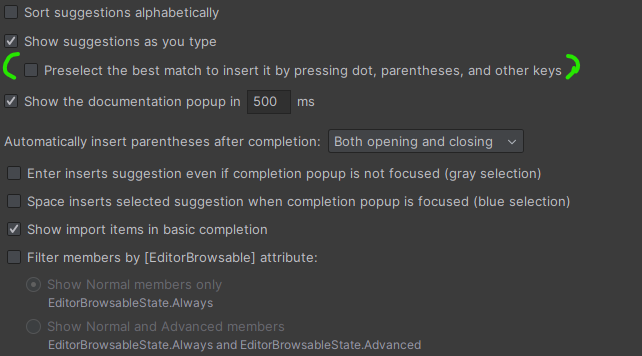
This is compounded by a second issue : depending on context, the suggestions from “suggest as you type” can be focused or not. It isn't clear to me what triggers the focusing, and I would expect “suggest as you type” to never be focused, and “invoked autocomplete” to always be. In the next two screenshots the difference was that I added a ‘t’ to ‘star’ (first screenshot) an added ‘rt’ to ‘sta’ (second screenshot). Blue suggestions are inserted (unexpectedly in my opinion) by a `,` for example, whereas grey suggestions are only inserted with tab or enter (as suggested by the popup's hint)


I would be ok if “suggest as you type” never got focused, as when I invoke autocomplete, I'm ready for insertion to happen anyways.
Please sign in to leave a comment.
Hello B Evieux,
Thank you for reaching Rider Forum.
I have reproduced the issue, and the behavior seems not to be correct. Once the option is disabled, special keys should not autocomplete the code. Thus, I have created a corresponding record on our bug tracker: RIDER-131651 Autocomplete behavior: Preselect the best match with ".", "," and ";" works even if disabled
The issue is handled by a dedicated developer there. Please upvote it to indicate your interest and subscribe to further status updates.
Let me know if you have any further questions. Have a good day!
Hello and thanks. I just updated Rider to 2024.3.9 and confirm that it seems to work as intended 👍