Could you please elaborate on how this feature is triggered in VS? It'd be great if you could provide steps, screenshots, or minimal code to demonstrate this feature.
Thanks for the explanation. It's a great help for us to understand the issue.
According to my research, this feature is not yet implemented in Rider. We have a known feature request for this on our issue tracker: RIDER-44191 Tooltip on lambda expressions. Please subscribe and upvote it for further updates.

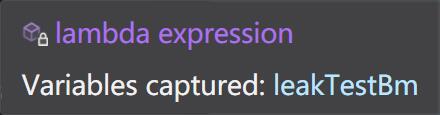
Hello,
Thanks for contacting Rider support.
Could you please elaborate on how this feature is triggered in VS? It'd be great if you could provide steps, screenshots, or minimal code to demonstrate this feature.
Thanks,
Tom
thanks for answering,
it's triggered by two ways:
1, mouse over the arrow of lambda which captured a local variable
2, mouse over the method name after the “+=” of a Action
then it shows the popup tooltips.
Hello,
Thanks for the explanation. It's a great help for us to understand the issue.
According to my research, this feature is not yet implemented in Rider. We have a known feature request for this on our issue tracker: RIDER-44191 Tooltip on lambda expressions. Please subscribe and upvote it for further updates.
Thanks,
Tom