Feature Request: Distinct Gutter Markers for Concurrent Staged and Unstaged Changes

Currently, the JetBrains IDE gutter change markers use hollow icons to indicate a line has been staged. If a user subsequently edits that same staged line, or an adjacent line, the marker in the gutter remains hollow, failing to provide a clear visual indication that there are further, unstaged edits present in the working directory. This lack of differentiation makes it impossible to visually identify unstaged work on lines already involved in the staging area from the sole text editor window, unlike the behavior seen in some other editors (e.g., VS Code).
I propose the implementation of a mechanism to visually distinguish between staged changes and subsequent unstaged changes on the same (or adjacent) lines within the editor's gutter.
Ideally, the gutter should be able to display both statuses simultaneously, perhaps using the existing solid markers (for unstaged) overlaid or adjacent to the hollow markers (for staged) on the relevant line(s). This would allow developers to immediately see which lines in their current file still require attention or staging before the next commit.
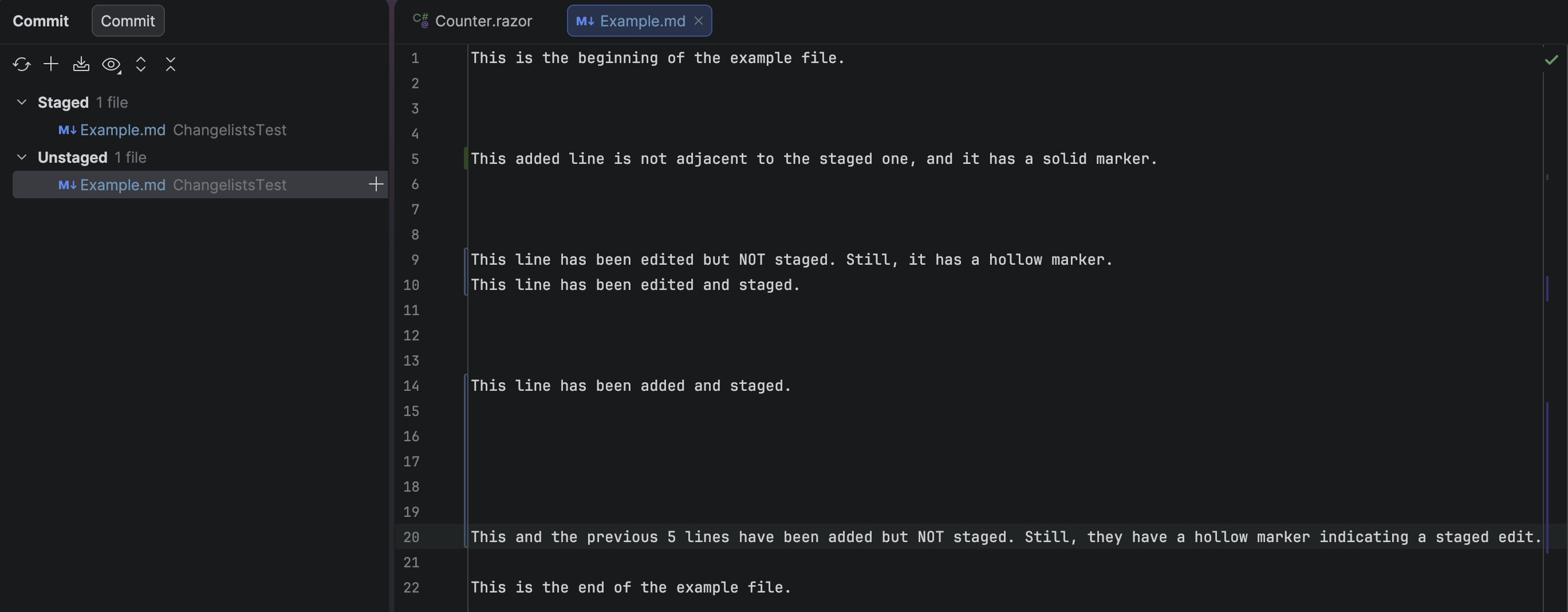
Here is an explicative screenshot:
Please sign in to leave a comment.
In your screenshot you can see that the gutter marker is half hollow and half solid. This means that some lines are staged and some are not. If you click on the gutter marker, you should see which particular lines are staged in the popup.
In the gif above, you can see the difference between solid, hollow and half-and-half gutter marker.