Open project inside WSL, GIT not working: IJent Error

Good morning,
I've opened a project inside my WSL.
But there is an error on Git.
When I go on Settings → Git → Path to Git executable: \\wsl.localhost\Ubuntu\usr\bin\git
Then i click test and he shows me this error: Git is not installed
unexpected error during communication with IJent
Git is installed on the WSL with the latest version
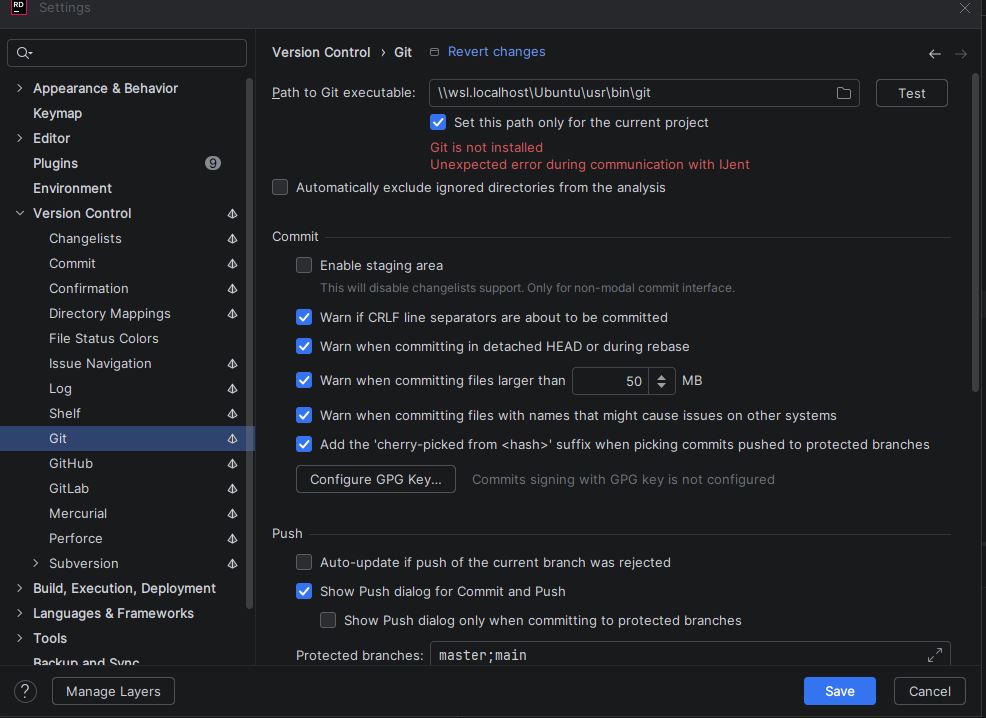
How can I resolve this issue?
Many thanks
Please sign in to leave a comment.
WARN - #git4idea.annotate.GitAnnotationProvider - Cannot Run Git:
Unexpected error during communication with IJent
com.intellij.openapi.vcs.VcsException: Cannot Run Git:
Unexpected error during communication with IJent
at git4idea.commands.GitCommandResult.throwOnError(GitCommandResult.java:172)
at git4idea.commands.GitCommandResult.getOutputOrThrow(GitCommandResult.java:156)
at git4idea.history.GitHistoryUtils.getCurrentRevision(GitHistoryUtils.java:196)
at git4idea.annotate.GitAnnotationProvider.getLastRevision(GitAnnotationProvider.java:541)
at git4idea.annotate.GitAnnotationProvider.getPathAndRevision(GitAnnotationProvider.java:523)
at git4idea.annotate.GitAnnotationProvider.populateCache(GitAnnotationProvider.java:494)
at com.intellij.openapi.vcs.annotate.AnnotationsPreloader$schedulePreloading$1.doRun(AnnotationsPreloader.kt:62)
at com.intellij.openapi.progress.util.BackgroundTaskUtil.lambda$runUnderDisposeAwareIndicator$15(BackgroundTaskUtil.java:372)
at com.intellij.openapi.progress.impl.CoreProgressManager.lambda$runProcess$2(CoreProgressManager.java:256)
at com.intellij.openapi.progress.impl.CoreProgressManager.lambda$executeProcessUnderProgress$14(CoreProgressManager.java:717)
at com.intellij.openapi.progress.impl.CoreProgressManager.registerIndicatorAndRun(CoreProgressManager.java:792)
at com.intellij.openapi.progress.impl.CoreProgressManager.computeUnderProgress(CoreProgressManager.java:748)
at com.intellij.openapi.progress.impl.CoreProgressManager.executeProcessUnderProgress(CoreProgressManager.java:716)
at com.intellij.openapi.progress.impl.ProgressManagerImpl.executeProcessUnderProgress(ProgressManagerImpl.java:75)
at com.intellij.openapi.progress.impl.CoreProgressManager.runProcess(CoreProgressManager.java:240)
at com.intellij.openapi.progress.util.BackgroundTaskUtil.runUnderDisposeAwareIndicator(BackgroundTaskUtil.java:367)
at com.intellij.openapi.progress.util.BackgroundTaskUtil.runUnderDisposeAwareIndicator(BackgroundTaskUtil.java:350)
at com.intellij.util.ui.update.DisposableUpdate.run(DisposableUpdate.java:19)
at com.intellij.util.ui.update.Update.execute$suspendImpl(Update.kt:61)
at com.intellij.util.ui.update.Update.execute(Update.kt)
at com.intellij.util.ui.update.MergingUpdateQueue.executeUpdates$suspendImpl(MergingUpdateQueue.kt:398)
at com.intellij.util.ui.update.MergingUpdateQueue.executeUpdates(MergingUpdateQueue.kt)
at com.intellij.util.ui.update.MergingUpdateQueue$restart$1.invokeSuspend(MergingUpdateQueue.kt:359)
at com.intellij.util.ui.update.MergingUpdateQueue$restart$1.invoke(MergingUpdateQueue.kt)
at com.intellij.util.ui.update.MergingUpdateQueue$restart$1.invoke(MergingUpdateQueue.kt)
at com.intellij.util.SingleAlarm$scheduleTask$1$1$1$2.invokeSuspend(SingleAlarm.kt:399)
at com.intellij.util.SingleAlarm$scheduleTask$1$1$1$2.invoke(SingleAlarm.kt)
at com.intellij.util.SingleAlarm$scheduleTask$1$1$1$2.invoke(SingleAlarm.kt)
at kotlinx.coroutines.intrinsics.UndispatchedKt.startUndispatchedOrReturn(Undispatched.kt:44)
at kotlinx.coroutines.BuildersKt__Builders_commonKt.withContext(Builders.common.kt:157)
at kotlinx.coroutines.BuildersKt.withContext(Unknown Source)
at com.intellij.util.SingleAlarm$scheduleTask$1$1.invokeSuspend(SingleAlarm.kt:397)
at kotlin.coroutines.jvm.internal.BaseContinuationImpl.resumeWith(ContinuationImpl.kt:34)
at kotlinx.coroutines.DispatchedTask.run(DispatchedTask.kt:100)
at kotlinx.coroutines.scheduling.CoroutineScheduler.runSafely(CoroutineScheduler.kt:610)
at kotlinx.coroutines.scheduling.CoroutineScheduler$Worker.runDefaultDispatcherTask(CoroutineScheduler.kt:1194)
at kotlinx.coroutines.scheduling.CoroutineScheduler$Worker.executeTask(CoroutineScheduler.kt:906)
at kotlinx.coroutines.scheduling.CoroutineScheduler$Worker.runWorker(CoroutineScheduler.kt:775)
at kotlinx.coroutines.scheduling.CoroutineScheduler$Worker.run(CoroutineScheduler.kt:762)
I’m experiencing the same problem. I’m unable to work on projects located in the WSL directory.
WSL version: 2.5.9.0
Rider version: 2025.3.0.3
Rider Same version,
my WSL version: 2.6.2.0
So I think it's a bug of rider.
Do we need to add a new issue on YouTrack?
I am also having the same issue
WSL version: 2.6.2.0
Rider version: 2025.3.0.3
Hello,
This should be a known issue tracked under IJPL-219668 Rider 2025.3 is shipped with wrong IJent version. It has been fxied in the codebase and should be included in the upcoming minor release. Sorry for the inconvenience.
Regards,
Tom