Changing Intellisense method documentation background

Hello,
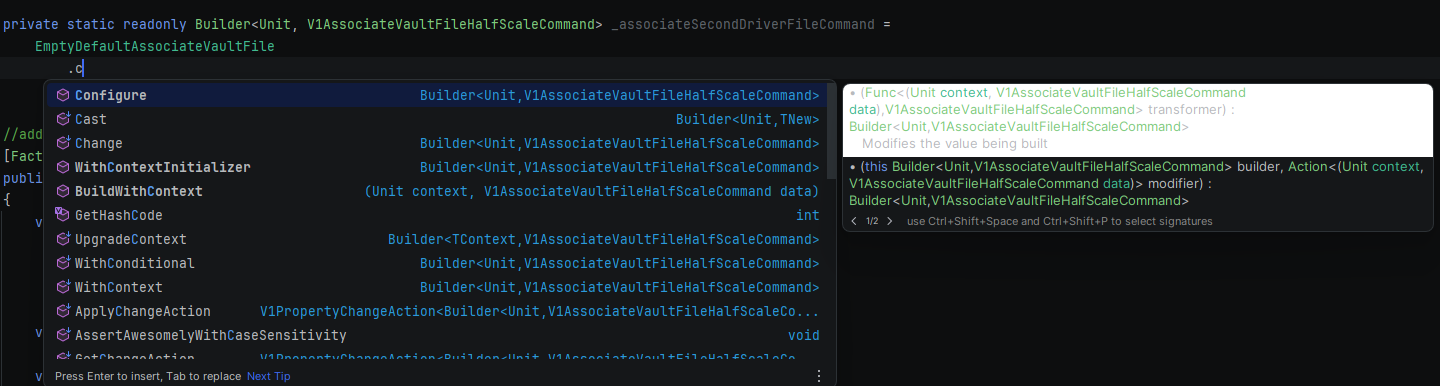
I have just installed a new theme which looks great except the selected method highlight color in the intellisense popup is a little jarring.
I would like to change this but am honestly not finding what option in settings → Editor → Color scheme I would need to change.
I have exported the theme as .icls file and tried searching for the hex code of that color but nothing seems to come up.
If anyone could point me in the right direction, that would be very much appreciated
Please sign in to leave a comment.
Hello Tim
Currently there's no way to do this by the settings and exporting the scheme to
.iclsand searching for the hex code didn't help because it only stores editor colors (code, gutter, popups/hints, etc.), not UI control colors. The specific color is set in the theme itself, so right now the only way to fine‑tune this exact color is to build a custom UI theme plugin where the JSON theme defines the selection colors for controls, including completion lists.