Solution explorer doesn't show all my directories or shows everything
Answered

I rigged up Rider with Unity and made a new project.
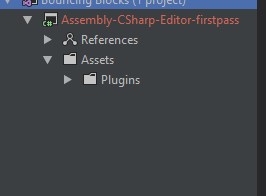
The problem is, in the solution explorer Rider doesn't see my whole project structure.
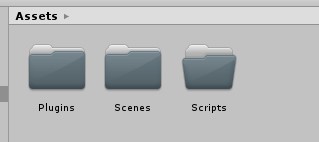
When using the cog button I reveal everything it gets out of hand. Is there a way in between? To see what I see in Unity?
EDIT: further, on my "Assets" folder I can add a whole bunch of new items, but on my revealed folders (like Scripts) I can add only a txt and JS etc irrelevant ones. How to add classes, interfaces and the like?

Please sign in to leave a comment.
Rider works with Unity based on project files that Unity generates, and Unity will generate projects based on what files are available in which folders. So in the screenshots above, it looks like you only have a single C# file in your project - quite possibly Rider's own plugin that improves integration with Unity. And this means Unity has generated only one project, which is aimed at editor tooling, rather than the main game project.
It's not a good idea to include folders from Rider's context menus - Unity will regenerate the project files sooner or later and the changes can get lost. For example, adding the Scripts folder to the "Assembly-CSharp-Editor-firstpass" project will get removed when Unity regenerates the project files, as Unity creates different projects based on special folder names.
At the start of a project, it's a good idea to add C# scripts directly in Unity until the main project structure is set up - e.g. at least until you have an "Assembly-CSharp" project, which is the main game project. Once this is in place, it's fine to right click on a folder and add new scripts, or even include folders of scripts. But adding different file types might also get lost when Unity regenerates the project files. There's a project level setting in Unity's Editor Settings which lists the file extensions that will be included when the file is regenerated. If you want to add a custom file type here, e.g. json, then those files will be included when the projects are regenerated.
We get that this can be confusing when setting up a project, and we're looking to improve this in an upcoming update, showing an "Assets view" like tree rather than defaulting to a C# project view. We should be able to create files and projects a lot easier with this.
(And Rider doesn't offer to create C# files when you right click on a folder that isn't part of a project, because building C# files requires to be part of a project.)
Sod it, I have just realized I have to "Include in project" them by right click and do so. I'll leave this post here just in case someone else would need it.
@... Thank you! You just saved me from going insane! I could not for the life of me figure out why the images I added to the project would not show up in the File Explorer. I appreciate you!