What is this new feature in 2018.3 and how do I turn it off?
Answered

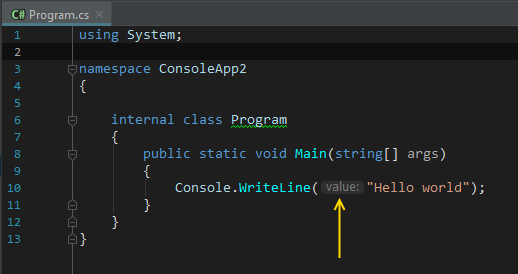
So I did the update to Rider 2018.3 today and now my editor is full of extraneous non-code (see the `value:` tag in the image below).
I disabled the new CodeVision feature and restarted - it still shows up. In my real code, it's incredibly distracting.
What is this new feature and how do I disable it?
~rick
Please sign in to leave a comment.
Found the solution - it's not a Rider thing, it's a Resharper thing.
https://blog.jetbrains.com/dotnet/2018/11/27/inline-parameter-name-hints-c-vb-net-resharper-rider/
Rpreston,
Yes, this feature is from ReSharper and is named parameter name hints. You can disable it in Rider via "File | Settings | Editor | Parameter Name Hints".