Can't checkout from Team Services
Answered

When trying to checkout from version control using "Team Services TFVC" option, I get a "contextList empty" error after signing in and entering my credentials. When returning from the oauth2 browser flow modal, the view freezes for a few seconds, it then flickers showing another form for an instant before returning back to where I was with said error displayed on the bottom.
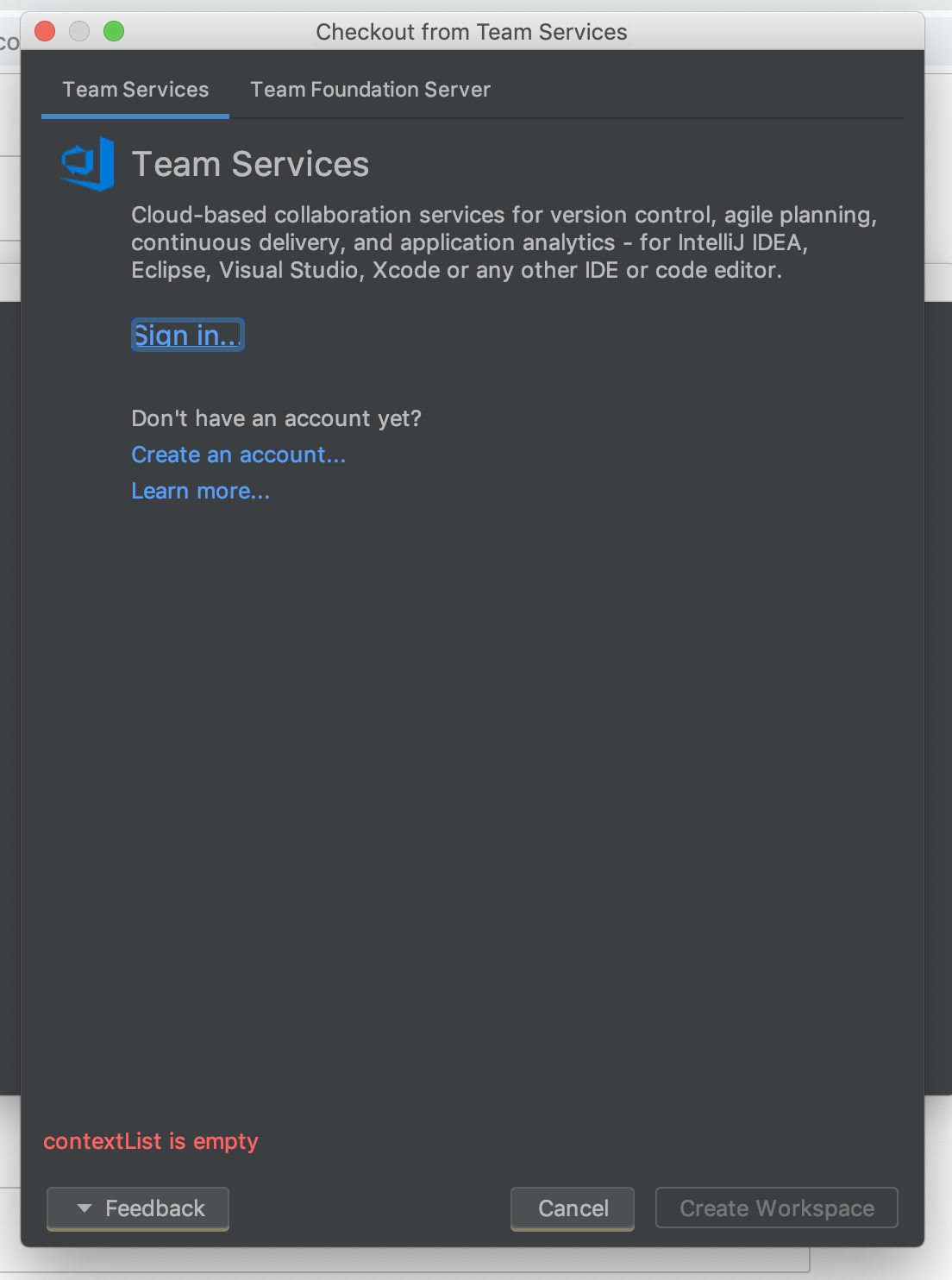
Nothing of interest is output to logs, as far as I can see. Here's a tail of all .log files.
==> frontend.log <==
21:29:02.152 | INFO | VsoAuthenticationProvider | authenticateAsync for server: https://app.vssps.visualstudio.com
21:29:02.152 | INFO | VstsPatAuthenticator | Signing out from uri: https://app.vssps.visualstudio.com

==> idea.log <==
21:29:02.152 | INFO | VsoAuthenticationProvider | authenticateAsync for server: https://app.vssps.visualstudio.com
21:29:02.152 | INFO | VstsPatAuthenticator | Signing out from uri: https://app.vssps.visualstudio.com

==> frontend.log <==
21:29:02.153 | INFO | OAuth2Authenticator | Ready to launch browser flow to retrieve oauth2 token.

==> idea.log <==
21:29:02.153 | INFO | OAuth2Authenticator | Ready to launch browser flow to retrieve oauth2 token.

==> frontend.log <==
21:29:02.153 | INFO | OAuth2Authenticator | Attempt to use oauth2-useragent provider: JavaFx

==> idea.log <==
21:29:02.153 | INFO | OAuth2Authenticator | Attempt to use oauth2-useragent provider: JavaFx

==> frontend.log <==
21:29:02.153 | INFO | OAuth2Authenticator | Using oauth2-useragent providers to retrieve AAD token.

==> idea.log <==
21:29:02.153 | INFO | OAuth2Authenticator | Using oauth2-useragent providers to retrieve AAD token.

==> frontend.log <==
21:29:32.583 | INFO | HttpProxyServiceImpl | useHttpProxy: false

==> idea.log <==
21:29:32.583 | INFO | HttpProxyServiceImpl | useHttpProxy: false

==> frontend.log <==
21:29:43.679 | INFO | VsoAuthenticationProvider | getAuthenticationInfoAsync succeeded

==> idea.log <==
21:29:43.679 | INFO | VsoAuthenticationProvider | getAuthenticationInfoAsync succeeded

==> frontend.log <==
21:29:43.680 | INFO | HttpProxyServiceImpl | useHttpProxy: false

==> idea.log <==
21:29:43.680 | INFO | HttpProxyServiceImpl | useHttpProxy: false

==> frontend.log <==
21:29:44.296 | INFO | ServerPollingManager | Timer fired

==> idea.log <==
21:29:44.296 | INFO | ServerPollingManager | Timer fired

==> frontend.log <==
21:29:44.296 | INFO | ServerEventManager | triggering ALL events

==> idea.log <==
21:29:44.296 | INFO | ServerEventManager | triggering ALL events

==> frontend.log <==
21:29:44.296 | INFO | ServerEventManager | triggering event: BUILDS_CHANGED

==> idea.log <==
21:29:44.296 | INFO | ServerEventManager | triggering event: BUILDS_CHANGED

==> frontend.log <==
21:29:44.296 | INFO | ServerEventManager | triggering event: PULL_REQUESTS_CHANGED
21:29:44.296 | INFO | ServerEventManager | triggering event: WORK_ITEMS_CHANGED

==> idea.log <==
21:29:44.296 | INFO | ServerEventManager | triggering event: PULL_REQUESTS_CHANGED
21:29:44.296 | INFO | ServerEventManager | triggering event: WORK_ITEMS_CHANGED

==> frontend.log <==
21:29:44.487 | INFO | ServerContextLookupListener | loadContexts activeOperation with 0 contexts and a scope of PROJECT

==> idea.log <==
21:29:44.487 | INFO | ServerContextLookupListener | loadContexts activeOperation with 0 contexts and a scope of PROJECT

==> frontend.log <==
21:29:44.488 | INFO | VsoCheckoutPageModel | signOut called

==> idea.log <==
21:29:44.488 | INFO | VsoCheckoutPageModel | signOut called

==> frontend.log <==
21:29:44.488 | INFO | VstsPatAuthenticator | Signing out from uri: https://app.vssps.visualstudio.com

==> idea.log <==
21:29:44.488 | INFO | VstsPatAuthenticator | Signing out from uri: https://app.vssps.visualstudio.com
Any advice on this?
Running Rider 2018.3.1 on macOS 10.14.2 (Mojave).
Please sign in to leave a comment.
Hello,
It looks like a known issue of the Microsoft plugin for TFS integration (Visual Studio Team Services), which is embedded in Rider. The workaround suggested by the plugin developers:
Please let me know if this helps!