Rider with xamarin losing the arrow to show code behind on xaml files
Answered

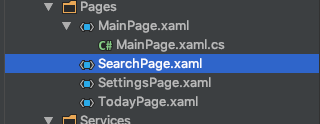
Is it just me or is this a rider issue?
I have never had this on visual studio and when I use rider this keeps happening.. Really annoying because I need to delete the file and add a new one to get access to the code behind file..
Is there a way to add the file back to my solution explorer?
Please sign in to leave a comment.
This bug will be fixed in Rider 2019.1: https://youtrack.jetbrains.com/issue/RIDER-24137