CSS code inspection - ignore particular syntax issue
Answered

GTK+ 3 has it's own barstardised version of CSS: GTK+ CSS Overview
The custom CSS nodes are not a problem - Rider allows you to "Add as custom HTML" tag.
What I can't seem to get Inspector Code to accept/ignore is the GTK CSS @define-color rule that allows me to get the user-specified colors from the current OS theme like this:
background-color: @theme_bg_color;
The Code Inspector just highlights it as "a term expected"...
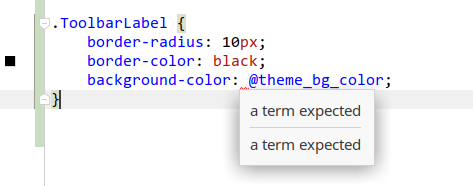
It doesn't have the usual options in the popup menu to allow me to look at the inspection rule.
Am I able to edit the CSS code inspection rules somehow, so it will accept this non-standard syntax?
Or can I do the equivalent of this somehow?
// ReSharper disable once InconsistentNaming
Thanks.
Please sign in to leave a comment.
'a term expected' is not an inspection, it's an error of the CSS parser. You cannot disable the parsing of a particular CSS file.