File name not visible in Rider's find usages list

So, I am working on a project with a .NET backend and React frontend both in their own individual folders called 'backend' and 'client' and I have the parent folder open as a project in Rider. In the 'client' folder when I try to find the usages of something (a component, function or variable) by control clicking, the list that Rider displays does not have the file names. It only displays the line numbers. See below screenshot.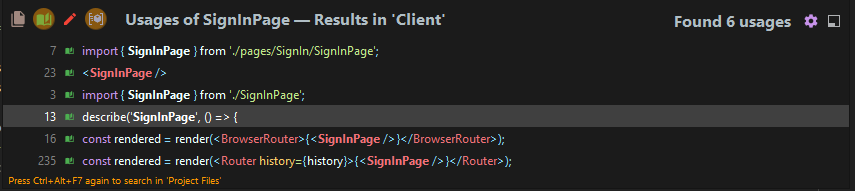
Whereas when I do the same in Intellij IDEA it works fine. Also if you look closely in the below screenshot, I have marked two icons with a red circle. These filter icons which I find to be really handy are also missing in the above Rider screenshot.
I switch between frontend and backend sometimes and it becomes really inconvenient to also switch my IDE because of the lack of this feature in Rider and because I can't do .NET / C# related work on Intellij
Is this something that can be fixed in the settings?
Please sign in to leave a comment.
Hello Shepard,
Thank you for taking the time to give us your feedback!
Unfortunately, this feature has not bee implemented yet. We already have a feature-request for this on our bug tracker: RIDER-56766. We would appreciate it if you would upvote the issue in order to demonstrate additional interest and bring increased awareness to the issue.
If you have any other questions, do not hesitate to ask. Have a great day!
It's quite surprising that such a fundamental and important feature has not yet been implemented in a JetBrains IDE. I'm not sure why there aren't a lot of votes yet for this feature request, but I really hope that this gets implemented sooner than later.