Diff Preview Location in the Git panel is wrong

The snapshot below shows some options in the Rider's Git panel.
The same options are available in PyCharm, and they specify whether the diff window appears on the right or at the bottom of the Git panel.
In Rider the options do exist, but they seem to have no effect. Regardless of the selection, the diff preview apears in an editor window.

Is it possible to get the same behavior as in PyCharm, that is to get the diff window inside the Git panel?
Please sign in to leave a comment.
Hi Stefano Menci!
Thank you for contacting us. What Rider version do you use? Do you have `File | Settings | Version Control | Commit => Use non-modal commit interface` enabled?
I've tried to reproduce it on my side on Rider 2021.1.1 and it works as expected.
Thanks!
Yes, Use non-modal commit interface is enabled:
I am using the 2021.1.1:
I tried enabling and disabling the Use non-modal commit interface, and that seems to affect how the Git | Commit is done, it doesn't seem to have any effect on how the Git panel (Git | Show Git log) behaves.
Stefano Menci, thanks.
Could you please also add a screenshot with Diff Preview visible? I don't see it on your first screenshot. Thank you!
Here it is, as you can see the diff is always inside an editor. This is very inconvenient, because I often work with 2-3 editors side by side. Each editor has the correct width to be used as editor, but not enough for a diff window. So every time I open a diff window I need to make it wider, and every time I switch back to an editor I need to shrink it. Working with PyCharm is much more intuitive: the diff is in the bottom, together with the Git stuff, I set it up once and it remembers it.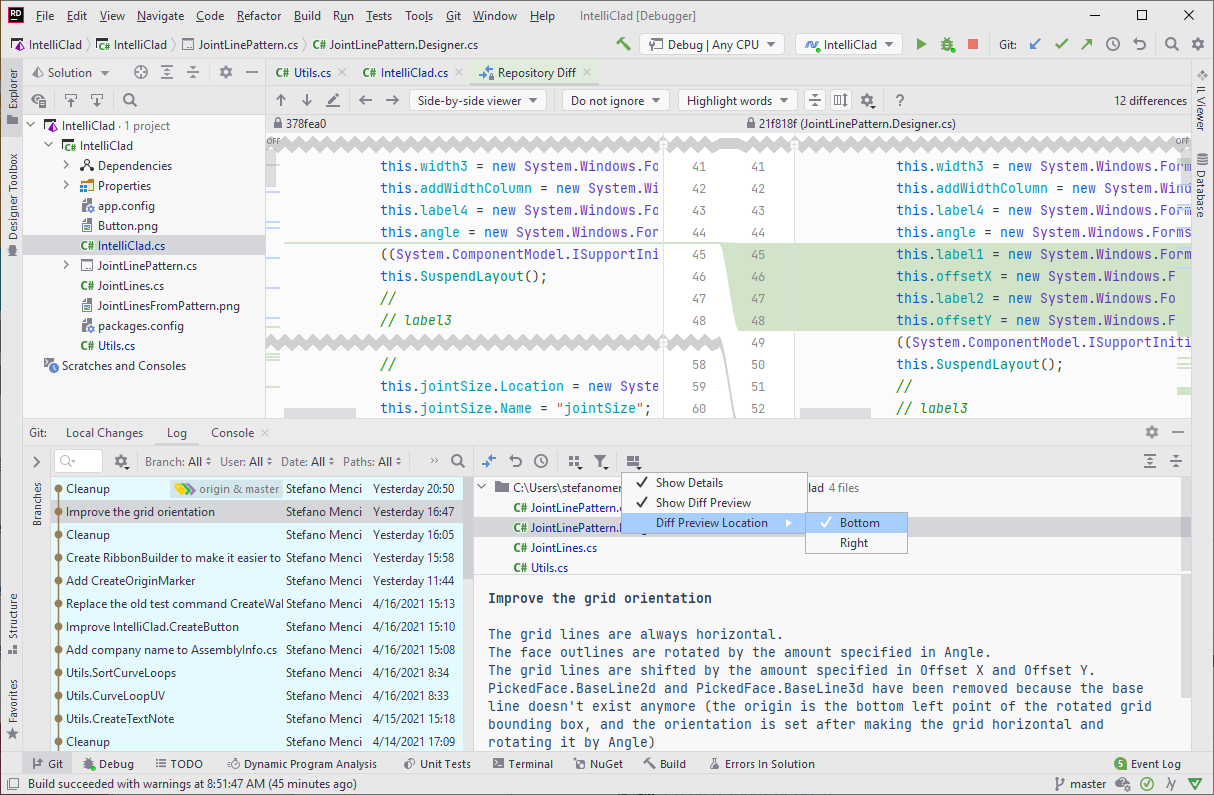
Thanks!
I suppose this is a known issue: RIDER-52791. Please, feel free to follow it for further updates.
Thank you.