Unable to find the Designer View in a UWP application

Hello everyone,
it seems like the Designer View to actually edit the layout of my UWP application graphically is missing. Yes, I checked if it is enabled in File -> Settings -> Tools -> Windows Forms Designer and it was already enabled by default.
After reading a related post, I checked if the rider.enable.designer.winForms setting is enabled in Help -> Find Actions -> Registry and it is indeed. Though I'm pretty sure these two settings are directly related, I checked it nonetheless.
The minimum Windows requirement for my UWP project is the Windows 10 Fall Creators Update (10.0.16299.0), but it didn't work with a Windows 10 minimum requirement either, which is the oldest version you can select. The project and solution are in the same directory. I am using Rider 2021.1.2.
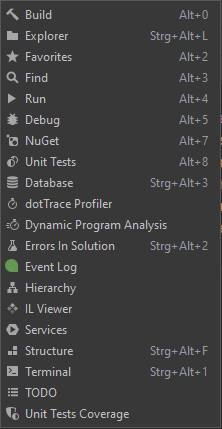
Here is a screenshot of the list of windows that are available:
I would be happy if someone could help me with this and eventually give me some tips for UWP development with Rider and UWP development in general. Thank you very much!
Please sign in to leave a comment.
Hi,
UWP designer is not supported yet. Please vote for the issue on Rider's tracker: https://youtrack.jetbrains.com/issue/RIDER-16327.
K.R.
Sofia
Thank you very much for your answer, Sofia. I wasn't aware of that. I assumed it was integrated due to the already existing UWP support. I'm looking forward to this feature in the future.
I appreciate your answer.
Kind regards