How can I set a post SOLUTION build event?
Answered

I have a solution which contains many projects. After all projects are build I need to zip up all the dlls and FTP the zip to a server. For the life of me I cannot find a way to set an event that fires after all of the individual projects are built. Or a way to ensure all are built after a final project is. No amount of googling seems to yield an answer.
Is this possible?
Please sign in to leave a comment.
Hello, Ed
There is no way to create a post-solution build event as it is in UI at the moment.
 With the "Before launch" feature, you can add the event "Build solution" and one more "External tool" event to make it run any script/program with zipping, transferring logic:
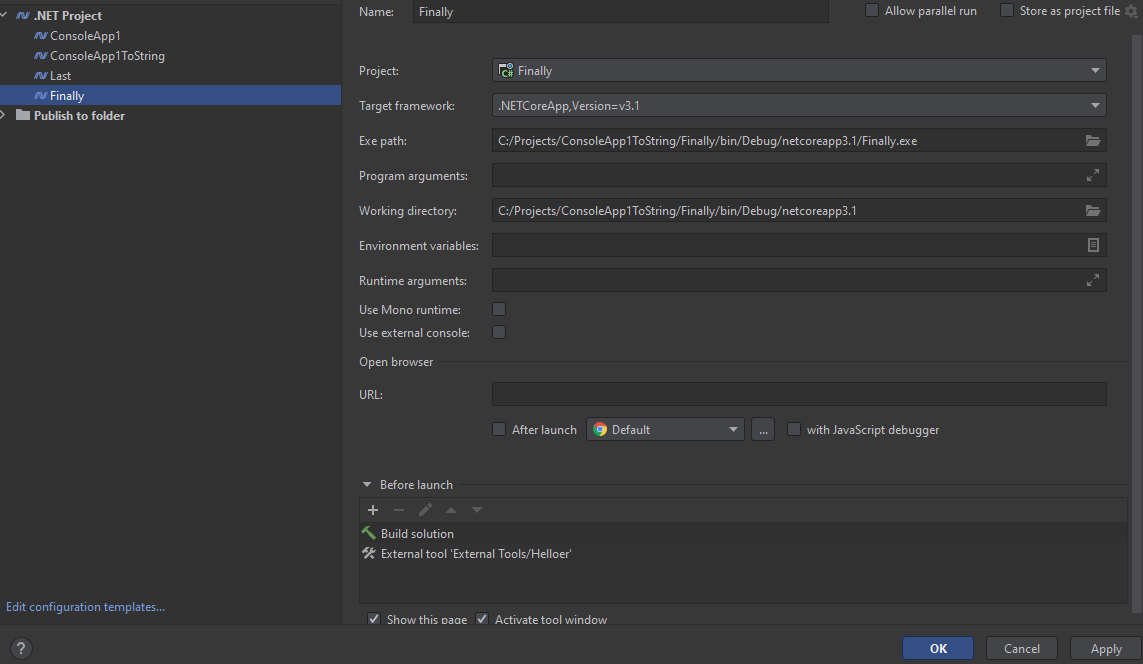
As an alternative, we can suggest adding the additional project to solution and creating Run configuration for it.
Then, by running this configuration, you will get what you described.
There will be an easier way to do it in the next version of Rider 2021.3. (see this feature). Users will be able to set up conditions for building a separate project (all other projects built) and add a separate post-build event.
Let me know in case of any questions.
Have a good day!
I also want to know about this for your question
Lonzobrown98 While Rider doesn't have a built-in solution-level post-build event, you can achieve this with an MSBuild targets file. MSBuild automatically imports a file named after.YourSolution.sln.targets if it exists next to the .sln file. Any targets defined there run once after the entire solution build completes — not per project.
Here is an example to get you started:
Note, this approach requires MSBuild as the build engine. It is not compatible with Rider's ReSharper Build feature. If you're using ReSharper Build, disable it first via Settings | Build, Execution, Deployment | Toolset and Build.