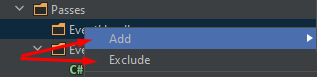
Exlude menu item so close to Add item

Why? )
I often make mistakes and press a button Exclude instead of Add.
And Exlude silantly exludes folder because no confirmation dialog showing.
It's bad UX in my opinoin.
Please sign in to leave a comment.
Hello,
You can configure items position in this menu on the settings page "Preferences | Appearance & Behavior | Menus and Toolbars".
In "Solution View Popup" item find the "Project Management" element and move it using toolbar narrow buttons. Then press "Save".
K.R.
Sofia