How many features Rider miss for frontend dev compared to WebStorm

I had been using Rider and WebStorm alongside but then switched to Rider only. As it been stated that Rider has everything for fe[frontend] development as WebStorm has (if not then please link to difference list) except starting templates I have found that is not the case. To work with fe project with Rider I have attached the root folder of fe to Rider like this:
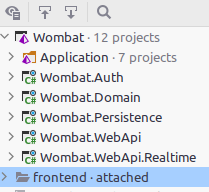
That allows me to works with fe files with auto completion, etc.
The one thing I remember now is when trying to rename files (plain js and vue templates) no related imports are updated whereas WebStorm does the refactoring correclty. Other one is somewhat simillar and it is about moving a file to a different location does not cause the IDE to update related imports in other files.
There are could be a lot of more of these missing parts but as I don't have an active licence in WebStorm to find more so above are the only ones I have recalled as it caused much pain. So the questions are: Is this by design? Is there a list to see what else is missing? Would it be implemented someday?
Please sign in to leave a comment.
Hi!
Can I ask you what Rider version do you use?
Reference updating for ts files is not supported right now. However, other refactorings should work, I suppose.
The version I am using is Rider 2021.3.2
Screencast where I tried to rename a js file: https://youtu.be/Agk6pHuQ-Fs
Recording a screencast I realized I forgot to mention something big about the issue I have. As shown in the screencast, the refactor option in the context menu is grayed out so probably the correct way to describe my problem would be that refactor options somehow is disabled(?).
Well. That's a support
Hi 16fi N Dzhali!
Sorry for the delay.
Could you please clarify, is the file mentioned on your video is from the attached folder? Do you have the same issue with any js files directly included in your project?
Yes, the demonstrated issue is from the attached folder that I have mention in the head post. And the same issue is also observed with any js files but also when trying to rename a vue file that's referenced in js file. Also, opening the fronted app as a folder in Rider still carries the same behaviour. Some notes about the frontend: the app had been created using vue-cli and current version of vue is 2. And the content of indexLayout.xml from .idea folder (why not):
I probably should also mention I am running Rider on the Linux Mint 20.3 but I think it should be irrelevant as WebStorm on the same system was working fine.
As a sidenote, I have also tried to recreated the issue (renaming one) in the one of the available templates (React+asp net core) but it works as intended (After renaming initiated, a pop up window is showed where you can select the scope and after that I get the list of what would be updated).
Hi!
Thank you for the clarification. Unfortunately, it is a known issue with the attached folders: RIDER-56733. Also, the "refactor this" feature will not work when you open projects as a folder.