CodeStyle for C# FileLayout - SerializeField for field or backing field of auto-Property

What is the rule for matching serialized field or auto-property?
public bool SomePublicField;

[SerializeField]
private bool SomePrivateSerializedField;

[field: SerializeField]
private bool SomePrivateSerializedProperty { get; set; }

[field: SerializeField]
public bool SomePublicSerializedProperty { get; set; }
I want to match those four in one group in FileLayout rules.
This is my starting point and it doesn't work as expected:
```
xmlns:unity="urn:schemas-jetbrains-com:member-reordering-patterns-unity">
<Entry DisplayName="Serialized Fields and Properties">
<Entry.Match>
<unity:SerializedField />
</Entry.Match>
<!-- No sorting -->
</Entry>
<Entry DisplayName="Non-serialised Fields">
<Entry.Match>
<And>
<Kind Is="Field" />
<Not>
<unity:SerializedField />
</Not>
</And>
</Entry.Match>
<Entry.SortBy>
<Readonly />
<Name />
</Entry.SortBy>
</Entry>
<Entry DisplayName="Properties">
<Entry.Match>
<Or>
<Kind Is="Property" />
<Not>
<unity:SerializedField />
</Not>
</Or>
</Entry.Match>
</Entry>
```
Is it supported? What's the closest supported version of the rules?
Similar problem here: https://rider-support.jetbrains.com/hc/en-us/community/posts/4409933268754-Attribute-field-SerializeField-for-properties-is-unseen-while-rearranging-
Alexandra Guk - I'm pinging you because you replied to that previous topic. Could you also help?
Please sign in to leave a comment.
Hi Trooperice!
Please try to use this layout:
If it does not fit your expectations, please add a sample screenshot of how you want to see your code. We will be glad to help you with adjusting the layout.
Should you have any questions, let us know. Have a great day!
Unfortunately, it doesn't work as expected :/
For now, that's my layout settings:
This is the layout I want to achieve (in the comments I described what matching-groups should contain):
Hi Trooperice!
Could you please also add a screenshot of the Code Cleanup results with your file layout - how do you see it now?
Empty lines are not regulated by file layout. For this, use File | Settings | Editor | Code Style | C# => Blank Lines.
Thanks!
This is what it looks like after cleanup (lines 28-30) should be between first and second comment:

One more example:

This is a valid layout
This is after cleanup:
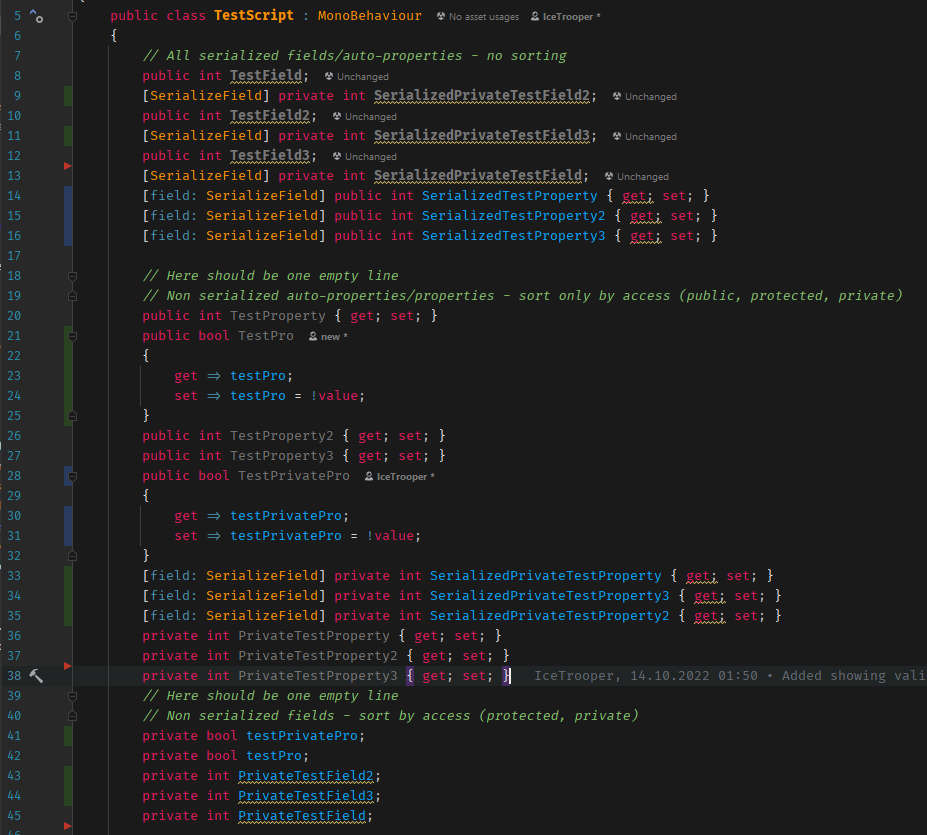 Public auto-properties (lines 14-16) have been moved to the bottom for some reason (they should be left untouched). Private serialized auto-properties (lines 33-35) as in the previous case have been moved to the bottom. They should be between the first and second comments.
As you can see, something is still wrong. :/
For blank lines, I found that I had 1 blank line set for auto-properties. I changed it to 0 before making these screenshots.
Hi Trooperice!
Thank you for the details. Is the layout provided above full? Do you have anything else in your Unity layout tab? Please, attach the full layout "as is".
Thanks!
This is my current Unity File Layout
Bump
Alexandra Guk Do you know what is wrong with my layout?
Hi Trooperice!
Please accept my apologies for the delayed answer.
We've checked different scenarios, and it looks like you've faced a known issue that [field: SerializeField] attribute is unsupported in file layouts. However, I've created a separate issue with all the details of your case. We'll double-check if it is the same or a separate issue. You can follow it to be notified about the updates.
Should you have any other questions, let us know. Have a great day!