<> Auto Completion function does not work.

In the 2019 version, if you type < after #region,
IDE automatically put > on the back, but the function does not work after 2020
How do I activate this feature?
I can't find it even if I search all the settings.
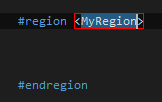
* 2019 version, <> Auto generated.
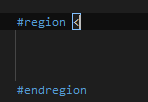
* 2022 version, <> not work but "", (), {} still work..
Please sign in to leave a comment.
Thank you for contacting Rider support and reporting this issue to us.
I reported [this bug](https://youtrack.jetbrains.com/issue/RIDER-84877) to our tracker. We would appreciate it if you could upvote this issue to demonstrate the additional interest.
Should you have any other questions or difficulties, please let me know.
Have a nice day!