Can put the cursor/caret in any place, even if there aren't any characters there

So basically i can put the caret anywere, even if there isn't any "characters" there. If i open the file in any other editor, like Visual Studio for example, i can only put the caret where there where there is characters, even if those characters are spaces. But for some reason i can put the caret anywere, even if there aren't any spaces or characters there.
The following images might explain what is happening better
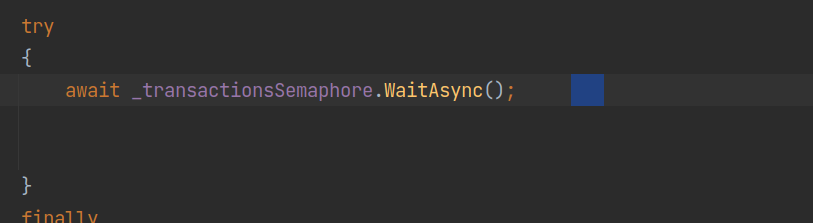

As you see Rider is letting me select a region of text that just doesn't exist. There aren't any characters after the WaitAsync();
This makes navigating code extremely difficult as previously i could just click in a line of code and the caret would land at the end of the line, instead of where i clicked.
Why is this happening?
JetBrains Rider 2022.3.1
Build #RD-223.8214.53, built on December 20, 202
Runtime version: 17.0.5+1-b653.23 amd64
Linux
Please sign in to leave a comment.
Hello Quique,
Thank you for contacting support.
Most likely it is happening because of the Virtual spaces feature. Would you mind trying to disable it in
File | Settings | Editor | General | Virtual Space? Hope it helps.If it doesn't help or you have any other questions or difficulties, please let me know.
Have a nice day!
Hey there,
I have the same issue, and I tried to disable the “virtual space” option, but I'm not quite sure how to. Here are my settings:
- Am I looking at the right place?
- Is there another spot for virtual space settings?
Please note that I use a lot the “Clone caret [Above/Below] with Virtual Space” feature. It used to work perfectly well without the extra behaviour desbribed in this ticket.
Rider versions with the issue:
2026.2
2026.1.4
Thanks a lot
Hello Quique Alonso Astorga and Myriam Claveau-mallet ,
The settings shown in the last post are the exact ones that Dmitry mentioned.
Is it possible to provide Rider's settings in File > Manage IDE Settings > Export Settings, so I can try them on my machine? Upload them to our shared storage at https://uploads.jetbrains.com and provide upload ID.
Thank you in advance!
Here: Upload id: 2026_07_30_DgncKs1aqvJNSTE9HB36R7 (file: settings.zip)
Thank you so much for looking into this! This is driving me crazy…
Hello Myriam Claveau-mallet ,
In the settings you provided there is a checkbox set in Settings | Editor | General → Virtual Space → Allow caret placement → After the end of line(settings/options/editor.xml:25 → <option name="IS_VIRTUAL_SPACE" value="true" />), Also in the settings once they are imported the checkbox is set:
Could you please make sure that this option is unchecked? If it is, please check and uncheck it again.
This worked. Thank you so much! It was indeed this setting what causing me trouble.