How to turn off auto-indent lines below?

Hello!
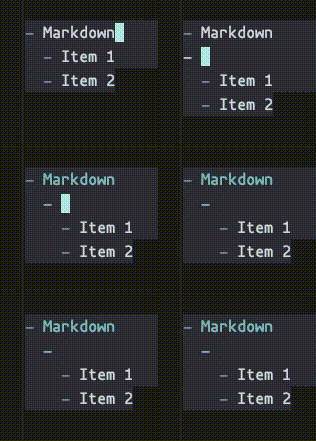
When indenting a line in Markdown, the lines blow are indented as well.
Can this behavior be turned off? Or am I doing it wrong?
To be clear, I wanted to add an item before Item 1 in this example, without indenting the others.
Cheers!
Please sign in to leave a comment.
Thank you for contacting Rider support.
The easiest way of adding an item before "Item 1" is to place the caret right before the Item word ("- |<--here Item 1") and press enter. Another option is to manually unindent the wrongly indented lines by selecting them and pressing Shift+Tab.
Hope it helps.
Should you have any other questions or difficulties, please let me know.
Have a nice day!