Using Rider under Linux: prerequisites

Development in JetBrains Rider under Linux will require at least one of the following additional frameworks depending on the kind of developed application:
- For regular .NET or Mono applications, install the latest stable Mono release from http://www.mono-project.com/download/.
- For .NET Core applications, install .NET Core for Linux.
Please sign in to leave a comment.
I'm running Ubuntu 16.04 with latest Mono (4.2.1) and .NET Core 1.1. When I try to open up a basic hello world project, I get the following:
Project 'helloworld' load failed
The lifetime has already been terminated.
Object name: 'Lifetime'.
Project 'helloworld' load failed: Can't connect to MsBuild project model process in 600000 ms
Any ideas on what the issue/solution could be?
Hi, I'm using Ubuntu 16.04 and I've installed Mono (5.2) and .NET (2.0). I created the sample shown here http://www.mono-project.com/docs/getting-started/mono-basics/#winforms-hello-world to verify that Mono is working.
I can run the application from the command line as the instructions say. But when I open the file in Rider 'Forms' in 'using System.Windows.Forms;' is red (and everything depending on it). Obviously I can not run the program from Rider and get the error: Program.cs(2, 22): [CS0234] The type or namespace name 'Forms' does not exist in the namespace 'System.Windows' (are you missing an assembly reference?).
What do I have to do to make Rider pick up the red parts?
@Ivan
Thanks for pointing that out. I was able to get things working with that information. It should be noted that Rider seems to be making some assumptions about the path where the dotnet executable is found at. In my case the executable in the /usr/bin directory is actually a shell script that sets up the environment before calling the real dotnet executable /opt/dotnet/dotnet . You have to point the configuration at the real dotnet executable or Rider will not find the SDK or runtime. I would think this would be more portable if Rider just ran "dotnet --list-sdks" to find the install SDKs and "dotnet --list-runtimes" verses making assumptions about how dot net is installed on the host systems. This is especially true of Linux distros which may move things around or like in my case use a wrapper script that makes things easy from the command line but not so easy for Rider to make assumptions about file system layout.
Again thanks I have things working now.
It is standard on all the linux distros ive used dotnet core on to have a shell script at /usr/bin/dotnet which then runs the actual executable /opt/dotnet/dotnet
/opt/dotnet is not on the path
@Richard thanks for your feedback!
As reference, here are the settings that seem to work with C# and F# on linux:
I cannot get Rider to recognize dotnet core. I have tried both 3.1 and 5.0 of the sdk and restarted multiple times but it cannot be auto detected nor do I have the capability to add the path manually
I find it super bizarre that there is no documentation or support beyond this page to get this set up on Linux.
Visual Studio Code works just fine right away.
Is it possible to use Rider on Linux for a .NET Framework version 4 project?
Everything I've searched for says I have to install the .NET Framework version 4 using Wine.
When I load a project I've inherited I see: The reference assemblies for .NETFramework,Version=v4.0 were not found.
What am I missing?
What's the point of Rider on Linux if it doesn't "just work".
I've installed Mono, dotnet core 3.0. How do I get this last component?
@Paul, I have added a request for snap dotnet cli autodetect https://youtrack.jetbrains.com/issue/RIDER-27491
@Patrick
I'm on Arch as well and if you scroll up a few comments you will find the clues you need to fix this but the steps are:
Another issue you will have relates to msbuild the mono version of msbuild does not work in all cases with dotnet core. I don't remember off the top of my head where those failures are but to fix it you need to use the dotnet core version of msbuild which was included when you installed dotnet core. You can leave mono msbuild installed if you want just know that if you do you will have to call each explicitly depending on what you are building. I personally have a script file in ~/bin/msbuild which contains:
#!/bin/sh
exec /usr/bin/dotnet msbuild "$@"
where /usr/bin/dotnet is the script that sets things up for dotnet core and executes /opt/dotnet/dotnet
Then I have ~/bin first in my path so the msbuild that I have defined is found first. After doing that things have worked as expected in Rider.
Oh on the command line after you have that script defined and in your path correctly when you run it the out put will be :
Microsoft (R) Build Engine version 15.9.20.63311 for .NET Core
Copyright (C) Microsoft Corporation. All rights reserved.
Don't forget depending on how you are launching Rider you may need to logout/login so that your new path will be seen. Or if you are launching rider from a script you could just change/alter the path for rider then restart it.
On Linux Rider does not detect dot net core even though it is installed. Mono is detected. How does Rider find the dot net installation? The CLI tools are on my path and work just fine from the command line. I have looked and looked but I can't find any information or configuration settings that I can configure to make this work.
Thanks
If you are using Ubuntu or a derivative distro (like pop_os), currently the "jammy-updates" suite in the official Ubuntu apt repos contains some of the .net packages, which can interfere with a .net installation done with the packages from the Microsoft apt repo.
I had to pin all the relevant dotnet packages (and reinstall .net), to get Rider to properly recognize the .net sdk. Like so:
Save as
Ivan Shakhov, I created this ticket for this issue: https://youtrack.jetbrains.com/issue/RIDER-67279.
The short of it:
TLDR: What .NET / .NET Core version should I install to provide a compatible MSBuild library? Is it even technically possible to build applications targeting .NET Framework 4.8 with Mono & Rider on Linux?
Cheers,
Adam
Ivan Shakhov and Steed
I believe the issue here is related to installing Rider via Snap or Flatpak where permissions are, by design, limited to the user's directory and ownership. This does not allow for Rider to see dotnet unless it is installed also under the current user and most installs are done system wide.
Installing Rider via the JetBrains Toolbox, Using apt, or manually installing appears to solve the permission issues I was having (as I installed first via flatpak) and seems to be similar with snap. Perhaps future versions of Rider can attempt to be aware of this issue in the future or allow for local installations of dotnet similar to npm/golang/composer/etc for the other JetBrains products.
Steed
Help->Report a Bug, agree to attach logs, follow up here with link to the issue.
I am using the snap package on Ubuntu (dotnet 5.0.3xx). When trying to create a core project I get an
Any Ideas?
JD, Ivan Shakhov
A temporary workaround I found was to manually install dotnet core in my home directory and add it to my path. This is not the recommended way of running core and is intended for Continuous Integration scenarios but as long as you are a single user on the system and do not mind manually updating then this could be a way to get up and running until a better solution comes along.
https://docs.microsoft.com/en-us/dotnet/core/install/linux-ubuntu#scripted-install
JD Please report with Help->Report a Bug. It is not going anywhere without a bug report, I am sorry.
On Debian 11, how do I solve the issue "Xamarin Android SDK is not found"? I've tried everything I can think and googled to no end. Any suggestions on how to fix this on Linux?
Same exact issue as Dasper. Running on Ubuntu 20.04 with .net 3.1 installed via apt (ms apt repo). It would be nice to be able to at least manually enter these paths. Any workarounds available?
Dasper, would you mind submitting a bug report with Help->Report a Bug and agree to attach logs?
hi,
dnx is already deprecated & replaced with .net cli - so should rider work with .net cli too?
Fedora 32.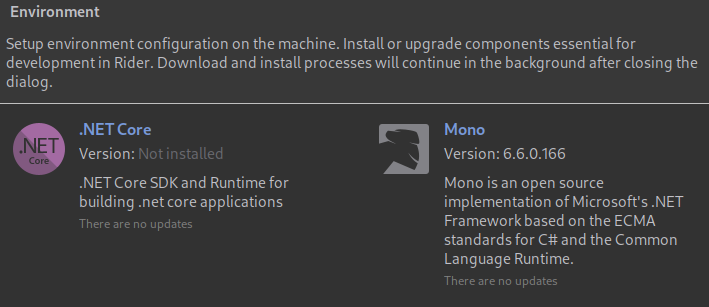
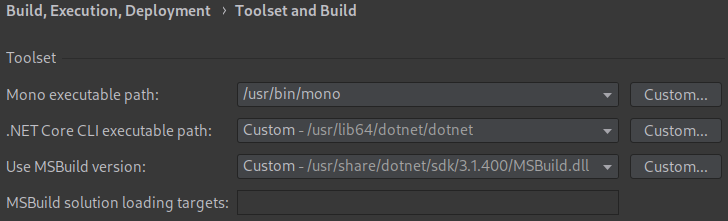

Both .NET Core and Xamarin are not detected.
My settings:
these settings produce the same outcome:
https://youtrack.jetbrains.com/issue/RIDER-48882?clearDraft=true&description=Version:%20RD-201.8538.1Timezone:%20Europe%2FBerlinEvaluation:%20trueEnvironment:%20RD-201.8538.1,%20JRE%2011.0.7%2010-b765.64x64%20JetBrains%20s.r.o.,%20OS%20Linux(amd64)%20v5.6.11-300.fc32.x86_64,%20screens%201920x1080.NET%20Core%203.1.3Logs:%20https:%2F%2Fdotnet-ea.services.jetbrains.com%2Ffiles%2Fso-attachments%2Fb9a7ffd8-a5dc-4e3c-95cc-51a000cb6937%2Frider-logs-attachment.tar.xz&c=Affected%20versions%202020.1.4%20(201.8538.1)
@Jay Freyensee Please report a new issue with Help->Report a Bug in Rider and agree to attach logs. I believe we would be able to help.
I'm having a similar issue only with mono and macOS. I used 'brew' package management to install mono 5.18 on my system and even though it manages to find msbuild and mono locations it cannot seem to find *any* of the .dlls (System, System.Core, System.Data, etc). I took a snapshot of the settings:

The libraries are there, here they are:
/usr/local/lib/mono/4.6.2-api
Js-Mac:4.6.2-api jfreyensee$ ls
Accessibility.dll System.Json.dll
Commons.Xml.Relaxng.dll System.Management.dll
CustomMarshalers.dll System.Messaging.dll
Facades System.Net.Http.Formatting.dll
I18N.CJK.dll System.Net.Http.WebRequest.dll
I18N.MidEast.dll System.Net.Http.dll
I18N.Other.dll System.Net.dll
I18N.Rare.dll System.Numerics.Vectors.dll
I18N.West.dll System.Numerics.dll
I18N.dll System.Reactive.Core.dll
IBM.Data.DB2.dll System.Reactive.Debugger.dll
ICSharpCode.SharpZipLib.dll System.Reactive.Experimental.dll
Microsoft.Build.Engine.dll System.Reactive.Interfaces.dll
Microsoft.Build.Framework.dll System.Reactive.Linq.dll
Microsoft.Build.Tasks.v4.0.dll System.Reactive.Observable.Aliases.dll
Microsoft.Build.Utilities.v4.0.dll System.Reactive.PlatformServices.dll
Microsoft.Build.dll System.Reactive.Providers.dll
Microsoft.CSharp.dll System.Reactive.Runtime.Remoting.dll
Microsoft.VisualBasic.dll System.Reactive.Windows.Forms.dll
Microsoft.VisualC.dll System.Reactive.Windows.Threading.dll
Microsoft.Web.Infrastructure.dll System.Reflection.Context.dll
Mono.C5.dll System.Runtime.Caching.dll
.
.
.
Yes, this message was for before. But, again, you haven't still come back to me to explain why it defaults to mono anyway, as it should be based on users' choice if they wish to use dotnet instead - specially for mono-incompatible .net executables.
Edit: After our conversation we agreed that the use-case prepending dotnet instead of mono is rare and once this situation changes as .net is moving to .net core 3 and .net 5, then there's more to think and discuss, so for now this seems to be non-issue.
I think we have discussed run configuration case with you on discord and found the solution to use Native Executable run configuration instead.
Ivan Shakhov I have a similar issue to @..., in detecting mono vs dotnet for run configuration. It always defaults to mono as the first choice for any .net executable file, regardless of the toolset settings correct dotnet path. I need to configure the run configuration to be run/built against dotnet and not mono for specific projects. Is there any work around for this?
Russell Robinson if you already have mono, try to open your project. If it fails, check what Build Tool is configured to be used in Rider - should be mono msbuild.