Yes, sure, I've double-checked on the latest release on both versions of UI. Do you add the button through File | Settings | Appearance & Behavior | Menus and Toolbars? What Rider version do you use? Is it New UI or the old one?
I figured it out but this is an indication that the UX/UI has issues because it's certainly not intuitive. I got the tip from one of the comments in here. The user was also frustrated!
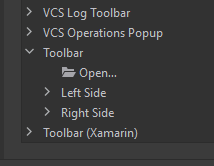
I was selecting the toolbar in the setting but I had to actually select 'left side' so that the Open node is inside instead of being at the same level of 'Toolbar'. First of all, I have no idea what 'left side' is. The user also was wondering what those mean. To me, the toolbar is just one toolbar. There's no visual indication on it that it consists of a left side and a right side.
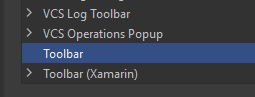
Also I was selecting left side and right side and suddenly these nodes just disappeared. You can see here the Toolbar in settings has no more nodes. I didn't click Remove or anything. I was just selecting child nodes. It seems this UI has some issues. I suggest that the documentation clearly states the user needs to select a child node in order for the action to show up in the tool or disallow the user from selecting the parent node if nothing can be added to it.
Thank you for your comments! I've transferred them for a proper team. I suppose these problems were mostly solved in NewUI, which you could enable in File | Settings | Appearance & Behavior | New UI. Feel free to try!

Hi Abdu Bukres!
The easiest way in your case is to remove this added Open button and add it again to the Left/Right side of the Toolbar. I hope this helps!
I have added it and reset the toolbar multiple times and also used two computers to do it. The icon never shows up in the toolbar.
Did you try it yourself and it works for you?
Hi Abdu Bukres!
Yes, sure, I've double-checked on the latest release on both versions of UI. Do you add the button through File | Settings | Appearance & Behavior | Menus and Toolbars? What Rider version do you use? Is it New UI or the old one?
I figured it out but this is an indication that the UX/UI has issues because it's certainly not intuitive.
I got the tip from one of the comments in here. The user was also frustrated!
I was selecting the toolbar in the setting but I had to actually select 'left side' so that the Open node is inside instead of being at the same level of 'Toolbar'. First of all, I have no idea what 'left side' is. The user also was wondering what those mean.
To me, the toolbar is just one toolbar. There's no visual indication on it that it consists of a left side and a right side.
Also I was selecting left side and right side and suddenly these nodes just disappeared.
You can see here the Toolbar in settings has no more nodes. I didn't click Remove or anything. I was just selecting child nodes. It seems this UI has some issues.
I suggest that the documentation clearly states the user needs to select a child node in order for the action to show up in the tool or disallow the user from selecting the parent node if nothing can be added to it.
I am using Rider 2023.1.1 the old UI.
Hi Abdu Bukres!
Thank you for your comments! I've transferred them for a proper team. I suppose these problems were mostly solved in NewUI, which you could enable in File | Settings | Appearance & Behavior | New UI. Feel free to try!