pre build events exec fail

Hi
i need for my project to add some pre build logic i got an error.
Target Name="PreBuild" BeforeTargets="PreBuildEvent">
<Exec Command="echo hello"/>
</Target>
even when my command is simple and contain only “echo hello” it is exit with the following error
Error MSB3073 : The command "echo hello" exited with code 1.
i am running on mac and it seems it failed to find temp build
Sahar/tmp2059db8ce9ef4f22bb76ecc47678f81f.exec.cmd: /var/folders/_7/j6rsn_bd79n8h4qydcsqt0q80000gn/T/MSBuildTempShauly: No such file or directory
maybe it is related to space i have in the home directory (my name?)
any ideas?
Please sign in to leave a comment.
Hello Shauly,

Thank you for your time spent leaving the feedback. I'm Tao from Rider support team.
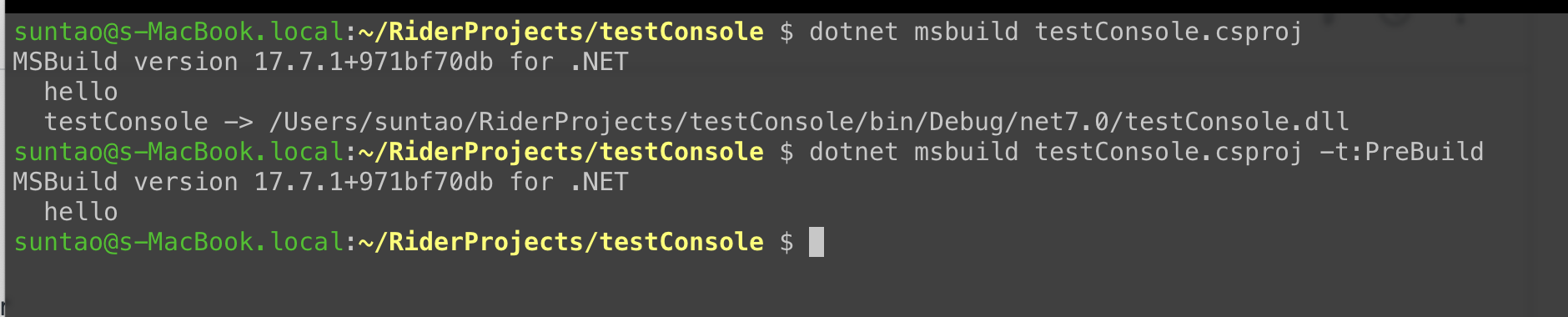
I create a simple Console App project as same as your scenario. Then I added same targets in the .csproj file.
When build the project in Rider the echo contents display in build output as expected.
You can do some quick test on Mac. You can execute "dotnet msbuild" command in the project root folder, it's same as using "msbuild" on Windows.
If there is no issue with your .NET Runtime environment, you should see the similar result as mine.
I also test scenario with spaces/capital letters in path, and it's still working normally.
Feel free to let me know if you need any help on using Rider.
Thank you in advance and have a nice day!
thanks i tried to run the "dotnet msbuild" in my project and it failes with the same reason.
any idea what to do next?
i suspect that the issue may be related to the fact that i have space in my path as my home directory is contain space (and i dont have an option to change it) could that be the issue? and if so what can be done?
Reset/Reinstall your .NET SDK may be helpful for your scenario.
The "dotnet msbuild" is integrated in SDK, if the project could not be built in command line, the problem is relates to your environment.
I'm not sure why your home directory includes space, as it's not allowed when I create test account on my Mac.
It appears that the issue is related to .NET SDK itself. You can conclude your situation in .NET repo on Github to see if there is any solution.
For any problems on using Rider IDE, feel free to ask me.
Regards,
The error is likely due to spaces in the home directory path. Try placing your project in a directory without spaces in the path, and update the paths in your build configuration accordingly to resolve the issue.
Feel free to post your questions here~
Regards,
seems that this is the issue, you can close it.