New line indent after code completion

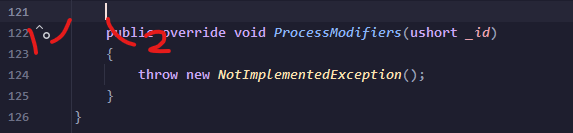
Hello, I am new to using rider and had a quick question about indentation. Whenever I press enter for a new line, Rider always chooses the correct place to indent to using my preferred settings. Except, when I do a code completion, for instance letting it add non implemented members, the empty lines around the auto completed member are not indented correctly, they instead are at the base of the line (1 in picture), and I have to tab them manually to keep them in line with the rest of the code (2 in picture).
Which code style setting should I change to make sure code completion empty lines start at the correct indentation?
Thank you for your time!
Please sign in to leave a comment.
I found it if anyone googles this later. It's called remove white space on blank lines.