Serious debugging problem with Rider on Mac with macOS Tahoe 26 (Update)

Please note that I've tried the nighlty build of Rider to see if the problem I will explain below still exist, and yes same thing:
Rider 2025.2 EAP 8 D
Build #RD-252.26300, built on September 6, 2025
Source revision: d3efa3ebabd6e
** Update 1 just a couple minutes after I've tested ‘Build #RD-252.26300, built on September 6, 2025’, I've seen ‘Build #RD-252.26321, built on September 7, 2025’. This new build seems to fix the issue since I was unable to reproduce the problem. I've just tried it a couple minutes though, but the problem occurred immediately after a failed assert, and now it's not the case. I'll update this post if the problem comes back. **
I am runing Mac OS Tahoe Version 26.0 Beta (25A5351b) on a Macbook Pro M4 Max with 128GB Ram.
I have a Solution with several projects, including a REST API and other library projects and Unit Tests. When I run a Unit test and one assert of my unit test fail, then immediately afterwards, the UI is broken. I mean I can't add a breakpoint (when click to set it nothing happens) and I can't run it either by click on the run/debug icon because nothing happens:

If I restart JetBrains, I am good to go until the next test hit a failed assert.
However, if I run a unit test that is in the same exact unit test project, and the test pass, then everything works as expected afterwards:
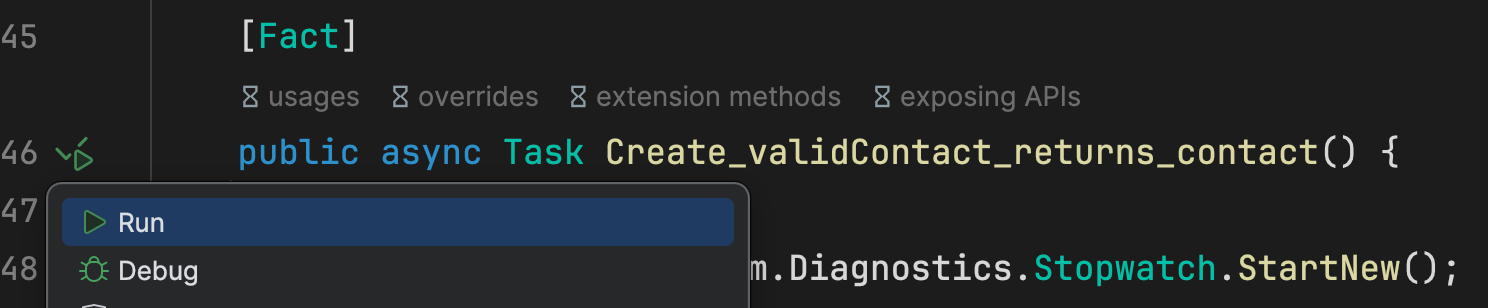

Extremely annoying. I really enjoy Rider, but this recurring problem makes me wonder if I should go back to another competitor. Yes its recurring since I had the exact same problem a couple weeks/ month ago.
Am I the only one with this problem?
Thanks for the help.
Please sign in to leave a comment.
Hello Dany,
Glad to hear that the issue doesn't happen on the latest version. If it happens again, please add a comment to this thread. I will then investigate further.
Thanks,
Tom
Howdy! Recently upgraded my M3 to Tahoe and experienced some odd behavior debugging in Rider. The ASP.NET web project would Run, but would experience an error starting Debug. Using netstat -anv, I was able to determine the port I was trying to use (5000) was already in use by ControlCenter. :/ Choosing a different port resolved it. Hope that helps someone save some time.