Find usage popup

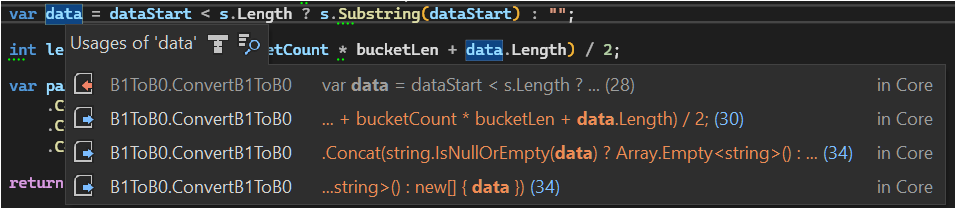
when using find usage, is there any way to make a simple mini popup in Rider like VS has as in the attached picture?
One with simply a single line for each of the instances?
Id rather not be forced out of the editor each time more than on instances exsists.
Please sign in to leave a comment.
Axa88888888 you can use the Edit → Find Usages → Show Usages action for this purpose. Rider will show a similar popup instead of launching full-fledged Edit → Find Usages → Find Usages search. You can find more information about this in Go to Usages of Symbol.
@... I was asking for a minimal UI as in Resharper, preferable anchored to the current context, rather than the full fledged tool window in which you appear to be referring.
Or am i missing something and it's possible to strip away all the busyness of this interface?
For even if i float the window (which i dont wish to do) and make it small, the interface is nested with so much noise that it hides the results and requires scrolling to find… kind of like a double search.
Perhaps if the
Search targetand full path of foldable folders could be removed.whats a lot closer is the
Go to Declaration or Usages, but when floating that, it consistently resizes and moves itself making it a bit funky, but bearable.Axa88888888, you should see a popup identical to the one from Go to Declaration or Usages when using Show Usages. For example:
The size and position inconsistency is a known issue IJPL-160680 Revise resize and positioning logic for the Show Usages popup, you can use the workaround described in the issue to make the behavior more consistent.
Well im not sure what ive done differently, but thats what im getting now using both
show usageandGo to definitions and usagesGuess i can live with the popup that doesn't anchor like the VS version i describe in the OP, but it sure would be nice and might solve the resizing problem linked. who knows..Thanks for the attention