Rider is ordering my variables by name...

as the title says, I wanna disable this weird behavior, I wanna it to be separate by “type weights” like separating statics private/public, private/protected/public, consts and so on
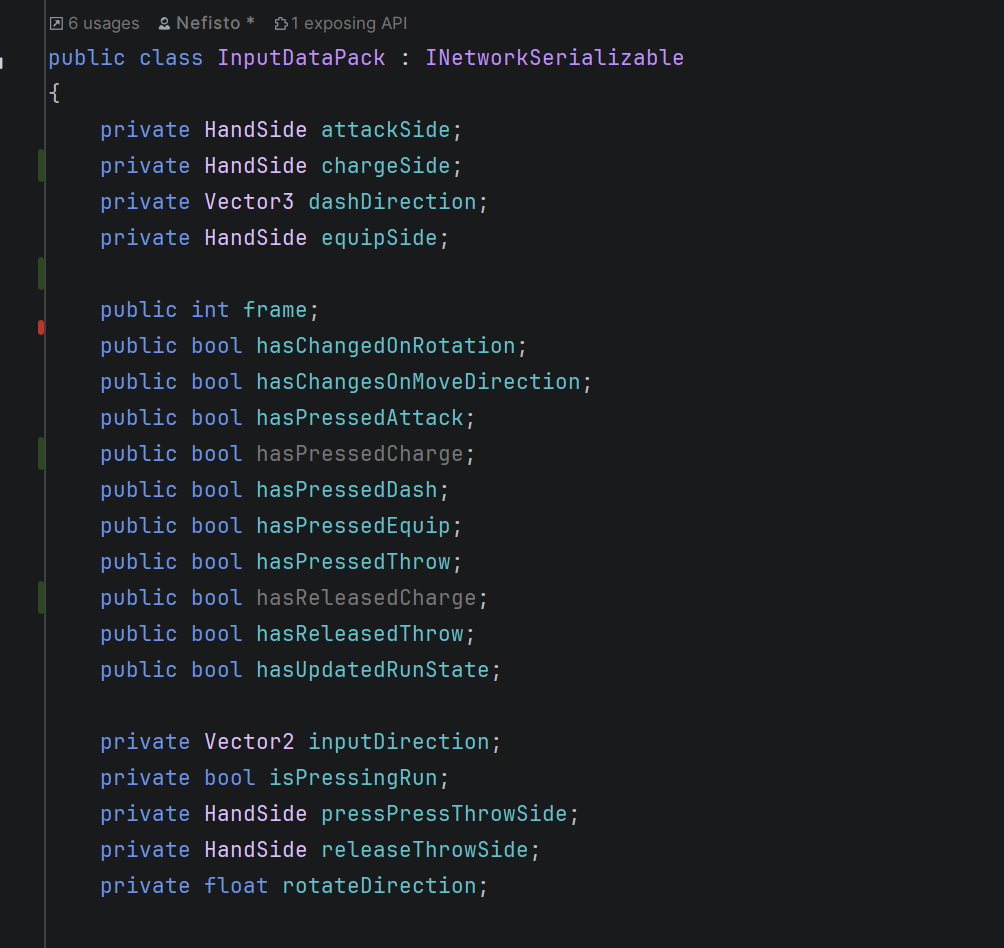
 

0
1 comment

Hello Joao,

Thank you for contacting JetBrains Support. 

The behavior you’re observing is due to Rider’s File and Type Layout feature, which automatically reorder C# code elements (like fields, properties, and methods) based on predefined patterns.

How to Customize or Disable This Behavior

1. Disable Layout During Code Cleanup

  • Option A: Avoid using the “Full Cleanup” profile (which includes file layout).
  • Option B: Create a custom cleanup profile: Duplicate an existing profile, then uncheck “Apply file layout”.

2. Modify the Default File Layout

  • Navigate to File | Settings | Editor | Code Style | C# | File Layout
  • To disable reordering entirely, load an empty pattern (no rules).

3. [Advanced] Create a Custom Layout

For granular control, follow Rearrange members with file and type layout patterns⁠⁠⁠⁠⁠⁠⁠ to create a custom file layout as you prefer. For example, the settings below will sort fields based on access modifier: 

   <Entry DisplayName="Private instance fields">
            <Entry.Match>
                <And>
                    <Kind Is="Field" />
                    <Not>
                        <Static />
                    </Not>
                    <Access Is="Private" />
                </And>
            </Entry.Match>
            <Entry.SortBy>
                <Readonly />
                <Name />
            </Entry.SortBy>
        </Entry>
        <Entry DisplayName="Protected instance fields">
            <Entry.Match>
                <And>
                    <Kind Is="Field" />
                    <Not>
                        <Static />
                    </Not>
                    <Access Is="Protected" />
                </And>
            </Entry.Match>
            <Entry.SortBy>
                <Readonly />
                <Name />
            </Entry.SortBy>
        </Entry>
        <Entry DisplayName="Internal instance fields">
            <Entry.Match>
                <And>
                    <Kind Is="Field" />
                    <Not>
                        <Static />
                    </Not>
                    <Access Is="Internal" />
                </And>
            </Entry.Match>
            <Entry.SortBy>
                <Readonly />
                <Name />
            </Entry.SortBy>
        </Entry>
        <Entry DisplayName="Public instance fields">
            <Entry.Match>
                <And>
                    <Kind Is="Field" />
                    <Not>
                        <Static />
                    </Not>
                    <Access Is="Public" />
                </And>
            </Entry.Match>
            <Entry.SortBy>
                <Readonly />
                <Name />
            </Entry.SortBy>
        </Entry>

Please note that Rider currently does not provide a friendly UI for creating and validating file layouts. This feature is tracked under RIDER-29621 user friendly UI for File Layout (designer)

Please let me know if you have any further questions. 


Thanks,

Tom

0

Please sign in to leave a comment.