Sticky Lines (?) still appear when clicking.

I completely disabled “Show sticky lines while scrolling” in Settings > Editor > General > Sticky Lines. However, when placing my cursor on a closed brace (as shown), it still shows sticky code above it, in the gray box. This sticky line disappears when I hover over it, so I can't try to disable it that way.
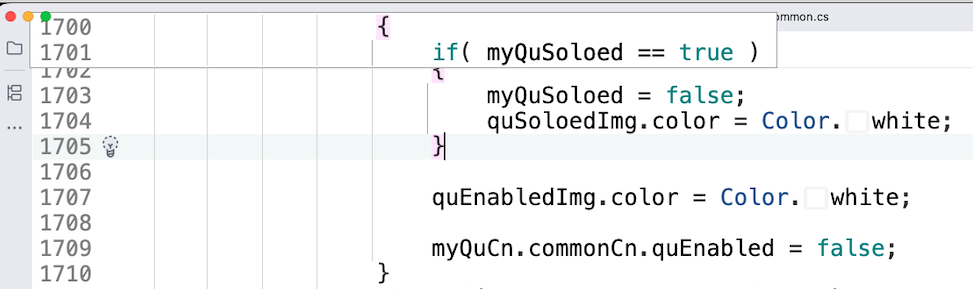
Similarly, if I click on any empty line, it shows the Class name in a sticky line.

How can I disable all sticky popups like this?
Please sign in to leave a comment.
Hello,
Thank you for contacting our support.
This is a known issue tracked under: RIDER-134431 Invisible brace hint appears when caret is on an empty line. Currently, we're aiming to fix it in 2026.1. Please note this timeline is subject to change. The best way to stay informed is to subscribe to it to receive further updates. We will update it if there is any progress.
Let me know if there is anything else I could help you with. Have a great day!
Thanks,
Tom