CPU Temperature spikes 20 degrees C while typing comment in Power Save Mode with Code Inspection Disabled

I had seen some issues posted from years ago about CPU/power use while typing, but did not see any specific resolutions for it. I noticed this while working on my laptop (running Ubuntu 25.10) where the fans would run at the highest setting whenever I was typing a comment. I ran the same tests on my desktop running Ubuntu 24.04 and Rider 2026.1.0.1. I am working on a GDExtension for Godot if that would make any difference. If anyone has any suggestions for this I would like to know because simply writing a comment in a header file with no code inspection enabled whatsoever makes Rider painful to use on my laptop.
Here are some annotated CPU temperature readings from my desktop with two comment sections - one with code inspection disabled, one with just code inspection enabled and the other listed settings applied to both:
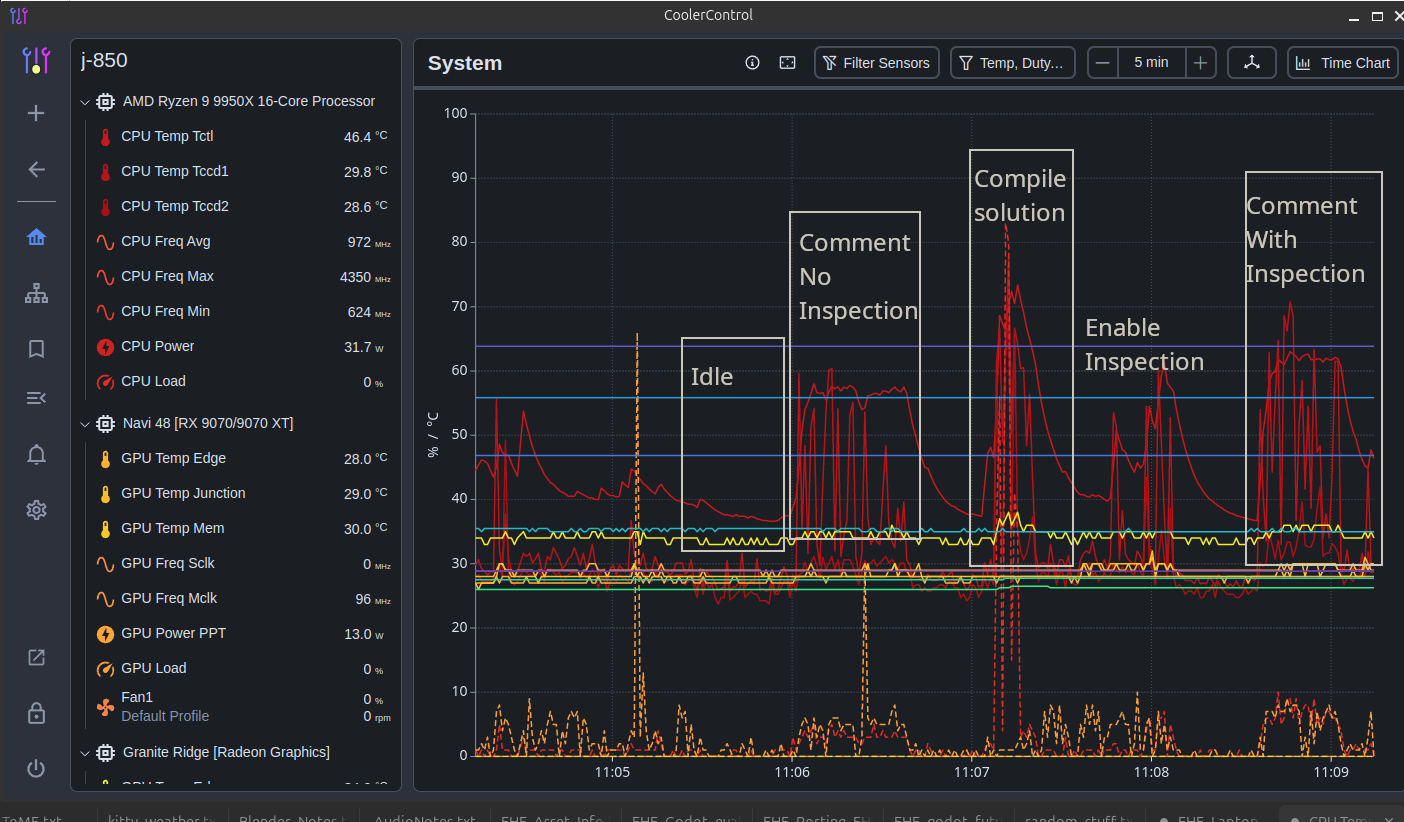
As mentioned, in this scenario I have:
- Power Save Mode enabled
- Enable Code Analysis disabled (including disabling Enable solution-wide analysis)
- Rosalyn analyzer disabled
Code inspection does not add much overhead versus whatever else is going on while typing a comment. For reference, these are the plugins I have enabled:
Subversion
CMake
Backup and Sync
Editor Config
JetBrains OS Integration
Visual Assist Keymap, Visual Studio 2022 Keymap, Visual Studio Keymap
Ini
JSONPath + JSON
TextMate Bundles
Git + Github
Modal Commit Interface
GDScript + Godot Support + Godot Support (Technical)
Images
Support for C++ Language
Task Management
Terminal
Time Tracking
Please sign in to leave a comment.
Hello Jordan,
Thank you for contacting Rider support. I am sorry to hear that you experience such an issue.
Would you mind sharing additional diagnostic information as described below, so that we can take a deeper look?
Upload this collected information to the Uploads service and let me know the Upload ID.
Hope to hear from you soon!
Hi Dmitry,
I uploaded the logs and profiling: Upload id: 2026_04_16_nbuDM5GFHhULzUQheJFxRN (files: MsBuild Worker (26833) Sampling 2026-04-16 12-16-05.zip and 2 more)
Just a note that there is no “Start CPU Usage Profiling”. The closest there was in the Diagnostics menu was Help | Diagnostic Tools | Profile Rider Internal .NET Processes | Start Profiling so I used that instead
I see you disabled the “Performance Testing” plugin. Please enable it back in File | Settings | Plugins | Installed and restart Rider.
This way the “Help | Diagnostic Tools | Start CPU Usage Profiling” action should become available.
A looked at the rest files and didn't notice anything suspicious. Please, reproduce the issue again while profiling CPU usage:
Upload the file generated in user home directory to the Uploads service and let me know the Upload ID.
Have a nice day!
Uploaded the CPU profiling: Upload id: 2026_04_17_kHrBYA9hVG5bVBkXJSSyci (files: RD-261.22158.394_17.04.2026_12.26.08.zip, RD-261.22158.394_17.04.2026_12.26.08.jfr)
Hello Jordan,
Thank you. I have investigated this behavior using a workstation with the same CPU (Ryzen 9 9950X) running Ubuntu 24. While a desktop cooling system manages these spikes more quietly than a laptop, the underlying telemetry remains consistent.
Here are the key factors contributing to the behavior we are seeing:
First, your charts (and I see just the same on my end) show that while the average CPU load remains low (around 5%), the frequency and power consumption spike to process real-time input. Note: there are no CPU Load spikes (except for the build task), which means IDE doesn't cause a high load on CPU.
The moment you type, the IDE transitions from "idle" to "active", triggering immediate CPU cycles for event processing.
In my testing (typing in .cpp files within a GDExtension project), I observed CPU power consumption jumps from 37W (IDE is idle) to ~95W (while typing). This is driven by the CPU boosting its frequency to maintain real-time input responsiveness. Even with Power Save mode enabled, consumption still hits ~80W. On high-performance chips like the 9950X, these rapid wattage spikes lead to 'thermal burst' fluctuations, where the internal CPU temperature rises faster than the cooling solution can modulate fan speeds.
Second, the "Power Save" mode reduces background intensity, but it cannot stop the IDE from being an IDE. To remain functional, Rider must still perform:
Third, the Ryzen 9 9950X is a powerful chip with high thermal density. On a laptop, the cooling solution has significantly less surface area than a desktop. While on desktop there are large heat sinks absorbing excess heat without the need to ramp up fans immediately, fans on laptop must react aggressively to small temperature spikes to prevent heat soak.
To sum up, the behavior you're seeing is the expected result of a high-performance CPU reacting to the real-time demands of a modern IDE. While the load is low, the "snappiness" of the IDE requires quick bursts of power.
Is this noise level consistent across your other devices, or is it specifically localized to this laptop? If it's only the laptop, it likely points to the manufacturer's aggressive fan curve settings rather than a software defect.
And did you consider the thermal compound/cooling system issue, by chance?
Have a nice day!
Hi Dmitry,
Thanks so much for the detailed investigation! That all makes a lot of sense. As far as noise across devices, the desktop with the 9950X is a bit loud due to being air cooled instead of using a water cooler. The thermal paste is very fresh since I just installed this CPU/motherboard 2 weeks ago. I may look into re-pasting the laptop since it's getting pretty old at this point; that would likely help there. I will be testing on an older 3800X with an identical heatsink/CPU fan combo this weekend and will be curious how it is there.
I'd mostly been looking at how to keep temperatures down with summer approaching since this room gets quite hot. I'll likely end up setting the TDP lower in BIOS to reduce overall CPU temperature soon.
Anyways, thanks again for looking into this!
Hi Jordan,
I am glad I was able to help clarify the behavior you're seeing!
If those temperature spikes become a concern—especially as the room warms up this summer—you might consider exploring these BIOS-level adjustments to find a balance that works for you:
I’m curious to hear how the 3800X performs in comparison! As a quick reminder, since that is an AM4 chip, you'll need to ensure you're testing it on a compatible motherboard, as the AM5 board used for the 9950X isn't compatible with 3800x.
One final thing to consider: since you mentioned the room gets quite hot, it’s also worth considering the ambient room temperature. Air coolers are only as effective as the air they pull in; if the room is hot, the fans have to work much harder to move the same amount of heat. Improving the airflow or using air conditioning can make a massive difference for the hardware—and, honestly, you’ll likely feel much more comfortable working in a cooled room yourself!
I understand that cooling a room can be challenging depending on many variables. However, I would be remiss if I didn't mention it as a major factor in your system's thermal behavior.
Have a great day and happy testing!