MACOS Rider errors with maui

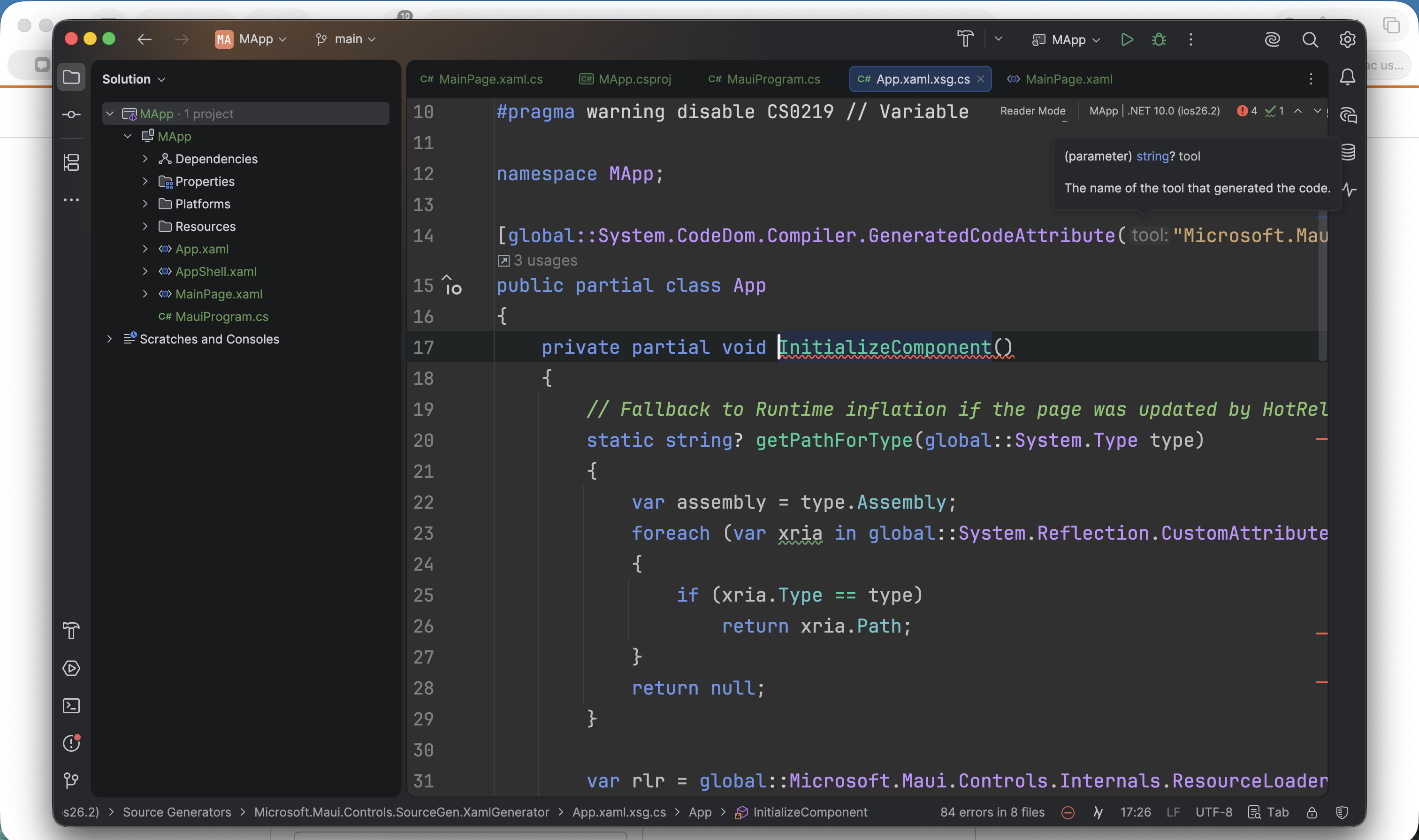
Title: Rider fails to resolve MAUI XAML generated code (InitializeComponent and __XamlGeneratedCode errors), while project builds successfully via dotnet
Environment:
- Rider version: 2026.1.1
- OS: macOS 26.4.1
- .NET SDK: 10.0.203
- MAUI workload: maui 10.0.20/10.0.100 SDK 10.0.200
- Project type: .NET MAUI
---
Description:
Rider reports multiple errors related to XAML code generation in a .NET MAUI project, including:
- No defining declaration found for implementing declaration of partial method 'void InitializeComponent()'
- Cannot resolve symbol 'InitializeComponentRuntime'
- The type '__XamlGeneratedCode__.__TypeXXXX' must be convertible to 'Microsoft.Maui.Controls.ResourceDictionary'
However, the project:
- builds successfully using dotnet build
- runs correctly
- shows no such errors in other environments (e.g. VS Code)
This suggests Rider's design-time build or XAML code generation/indexing is out of sync with actual MSBuild behavior.
---
Steps to Reproduce:
1. Create or open a .NET MAUI project
2. Add one or more XAML files (e.g. ResourceDictionaries)
3. Reference them via:
xml <ResourceDictionary Source="SomeFile.xaml" />
4. Open the project in Rider
5. Observe errors in editor
---
Expected Behavior:
- Rider correctly recognizes generated .g.cs files
- No false-positive errors for InitializeComponent
- XAML resources are resolved consistently with dotnet build
---
Actual Behavior:
- Rider shows unresolved InitializeComponent and related symbols
- Reports type conversion errors for generated __XamlGeneratedCode types
- Errors persist even after:
- rebuilding solution
- clearing bin/obj
- invalidating caches
---
Additional Notes:
- The issue seems related to Rider not properly handling MAUI XAML code generation
- Possibly tied to design-time build or MSBuild integration
- Opening and building the same project in Visual Studio may “fix” generation temporarily
---
Workarounds Tried:
- File → Invalidate Caches / Restart
- Deleting bin/ and obj/
- Forcing rebuild
- Verifying Build Action = MauiXaml
- Ensuring correct x:Class usage
---
Please sign in to leave a comment.
Hello!
We've tried to reproduce the issue you described, but with no success. According to your steps to reproduce, you can recreate the issue with a new sample solution. If so, could you please share it? Upload the file to our server and share the ID.
Thanks!
I had the same issue when creating a basic .Net 10 MAUI app via Rider. It looks like the issue is related to SourceGen being enabled, BUT triggered by a mismatch between the SDK and the workload. To resolve this, I just ran `dotnet workload update` and the issue was gone which might explain why Alexandra Guk could not reproduce it. Hope it helps!
Actually, I take it back. It doesn't work. The only thing I can do to resolve the issue is disable SourceGen by commenting out or removing this line from the project <MauiXamlInflator>SourceGen</MauiXamlInflator>
Hello Edward ,
Thank you for sharing this information.
Could you please clarify a couple of things for me:
Hi Anna,
1. Yes it persists, although I should clarify that I'm using .Net 10, not 9.
2. Invalidating Caches does not help, neither does removing the generated code - issue comes back as the code is re-generated.
Edward
Thank you, Edward , for the updates.
There is an issue that has been raised that seemingly reminds one that you have faced:
RIDER-117982 Rider reports errors but still builds successfully
Could you please provide logs from Help > Collect Logs and Diagnostic Data? Upload the archive to the comments of this issue. You may also change visibility permissions upon uploading if required.
Thank you in advance.
Hi,
If you tell me how I can upload archive to the comments of this issue, but I don't know how to confidently make it so that the settings of what I upload is available to Jetbrains support and only.
Thanks,
Eddie
Edward ,please follow the instructions below:
Set Issue, Comment, and Attachment Visibility
Anna Morozyuk, just a quick update to say that I'm back and will share the logs with you later tonight or tomorrow. I was away this weekend. Speak soon.
Hi Anna, I have tried, but I don't have an option to upload an attachment in comments. Your link also doesn't show instructions that match what I can see. Set Issue, Comment, and Attachment Visibility
Could it be because I'm not the issue author?
Hello Edward ,
Sorry for not articulating myself well, I meant in the YouTrack comment section:
Please attach the log archive here:
RIDER-117982 Rider reports errors but still builds successfully
Thank you in advance.
Hi Anna,
No worries - thanks for explaining. I've uploaded the attachment - it's tagged with jetbrains-team only, I'm assuming that means only JetBrains employees can see it. If not, can you please correct it for me?
Thanks,
Edward
Hey Edward ,
Yes, the attachemnt is visible only to Jetbrains team. Thank you.
Any update on this? It's very annoying.
I would also like to be able to build code locally with MauiXamlInflator with SourceGen enabled and get the benefit of the technology in Rider.
Edward, does your issue look like this one RIDER-141015 Errors in MAUI SourceGen generated files?
Looks like my situation anyway.
Dmitry Kazantsev yes, that’s the problem exactly. I’ve shared logs previously - linked above if it helps.
Got it, thank you for the confirmation. You might find the workaround mentioned on the issue page helpful. Have a nice day!
Dmitry Kazantsev Turning off the feature I need to use (build code locally with MauiXamlInflator SourceGen enabled) is not a workaround - it's the issue that needs to be solved.
Which workaround would that be? Clearing the cache? Doesn't help, it all comes back after Rider is done rebuilding it's indices etc. Disabling MauiXamlInflator SourceGen is as mentioned not a workaround. Please advise if there's an actual workaround that I missed.
Currently, the workaround is just to ignore the 238 errors (that's my count). The problem with that is that there might be a real error hiding there that's not visible due to all the noise.
You're right, there is no workaround at the moment Svante. What needs to happen now is for this work to be scheduled and the team to work on a fix and keep us up to date so we can help testing. In real terms, XAML Source Generation is supported and shipped in .NET 10, but still an opt-in early-adoption feature rather than the mature/default MAUI XAML pipeline - which probably explains why the fix is not available in Rider yet. Sadly 🥲
I mentioned disabling the Settings | Editor | Inspection Settings | Include source generated files. This in fact makes Rider to ‘ignore those errors’ in the generated files by preventing Rider from inspecting the source-generated files for code issues.
I understand that this is not a solution and may not suit someone. Unfortunately, I have no other option to suggest at the moment (except for the worse options with ‘disabling SourceGen’).
To be on the same page, that would be helpful to know what do you observe after disabling the Include source generated files option. I would appreciate that if you could share some screenshots that demonstrates what you observe.
Hi,
IIRC I tried that, and the problem then is that it does not take part at all in the analysis, causing Rider not to see the references. So then instead I get false positive hints/warnings about unused public properties etc. That's unfortunately even worse…
But thanks for engaging. I will send some screenshots later when I have access to a a system with the problem.
Thank you! By chance, is possible for you to share a repro solution with us? That would be very helpful for further troubleshooting.
Hope to hear from you soon.