How to prevent agent from using jetbrains ai subscription

I’m having trouble to force the correct account usage for different ai tools. I just notice that a few agent sessions used the jetbrains subscription instead of the linked chatgpt account.
How can i prevent this ?
This is the current setup - since yesterday, the second codex authorization was added without any confirmation….
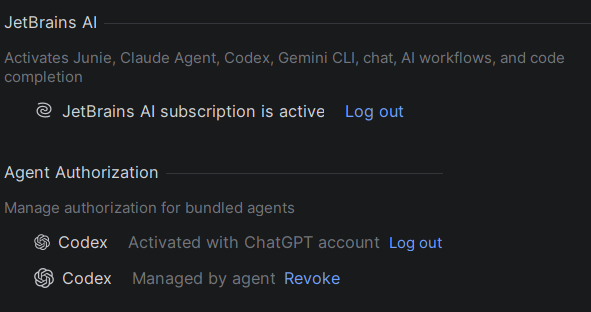
Removing the second authorization and starting a new agent session caused a new authorization request - so i hope that it use the correct account now but it should not happen in the first place
Please sign in to leave a comment.
Thank you for reporting the issue. This is a known problem tracked here: https://youtrack.jetbrains.com/issue/LLM-25565
Our development team is currently working on transitioning the Codex agent to the ACP protocol, and this issue is expected to be addressed as part of that work. We apologize for the inconvenience.
Please feel free to upvote and follow the issue for updates and notifications once a fix is released. There is no exact ETA available yet, but the fix is planned for an upcoming update.
In the meantime, the following workaround has been confirmed to help in similar cases:
1. Open `Settings | Tools | AI Assistant | Providers & API keys`
2. Log out of the JetBrains AI subscription
3. Revoke all existing agent authorization records
4. Re-authorize the agents one by one using OAuth or API keys
5. Start a new Codex chat to verify the selected authentication method
6. Log back into the JetBrains AI subscription
If the issue still persists afterward, please contact support and include troubleshooting logs for further investigation: https://jb.gg/ai-assistant-support
Instructions for collecting logs: https://youtrack.jetbrains.com/articles/SUPPORT-A-75/How-to-collect-IntelliJ-IDEA-logs-to-troubleshoot-AI-Assistant-issues
Hi,
this seems to be the cause of the problem - after resetting all authorization, i haven’t had any problems so far.
Thanks for the information