When pressing F5, I get a configuration selector, I just want to run whatever configuration I have already selected when pressing F5.
Answered

So far I'm really a fan of Rider, it's so much faster than Visual Studio.
I only have a small issue with it at the moment that I can't overcome:
When I press F5, I get this menu...
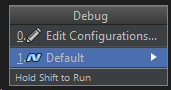
As you can see, there's only one configuration, and I want to just instantly run this "Default" configuration when I press F5, I don't want to also press 1!
I'm sure it's some setting somewhere, but I couldn't find it.
Thanks in advance :)
PS:
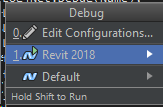
Also, when there's multiple configurations available, I want to automatically run whichever one is highlighted by default (Revit 2018 in this case):
Please sign in to leave a comment.
realy annoying behavior :(
We are hoping to fix this in the near future. Here is the corresponding issue on YouTrack: RIDER-4575. As a workaround, you can remove the F5 keybinding from "Resume program" in File | Settings | Keymap.
Rider 2018.2, dang that'll be a while :(