My rider is giving me conflicting formatting warning/suggests
Answered

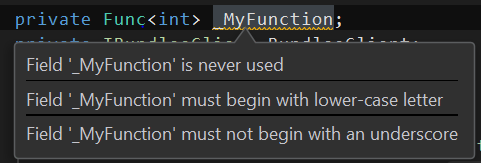
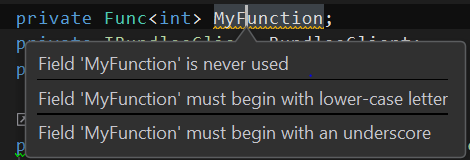
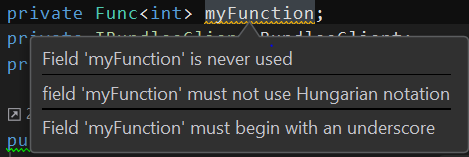
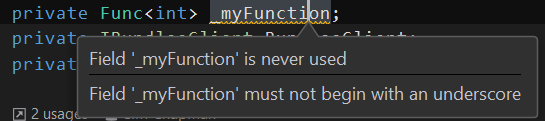
See screenshot, for some reason, all private fields are being highlighted and warned for formatting issues. (The first screenshot is my convention, and works fine in other projects)
This issue is project specific, yet I couldn't figure out exactly what is different. The same rider can open some other projects and the same formatting works fine.
I did notice I somehow have a linked .json file that has to do with style, but deleting it gives me error. Excluding it simply does not work.
If I open the project with visual studio I do not get the conflicting warnings.
See screenshots below
This is the content of the stylecop.json file that I notice is not present in other normal projects.
{
    "$schema": "https://raw.githubusercontent.com/DotNetAnalyzers/StyleCopAnalyzers/master/StyleCop.Analyzers/StyleCop.Analyzers/Settings/stylecop.schema.json",
    "settings": {
        "indentation": {
            "indentationSize": 4,
            "tabSize": 4,
            "useTabs": false
        },
        "documentationRules": {
            "documentInterfaces": false,
            "documentInternalElements": false
        }
    }
  }
Please sign in to leave a comment.
Hello,
Thank you for contacting us.
This behaviour is caused by installed StyleCop.Analyzer package.
The same behaviour is reproduced in VS also, not sure why it's not working in your case.
You can either configure stylecop.json so rules will meet your needs (please refer to the following post for more information - https://blog.jetbrains.com/dotnet/2018/09/24/roslyn-analyzer-rulesets-stylecop-json-support-rider-2018-2/) or just uninstall StyleCop.Analyzers package using Manage Nuget Packages window.
Thank you.