Rider 2019.3 doesn't open all WinForms in designer

Hello,
I'm using Rider 2019.3 on Windows 10. I have a dotNet Framework 4.7.1 Class library project using System.Windows.Forms.
When switching to Rider i have encountered the problem, that i can't open all of my WinForms in the integrated designer. I can't find information about under which circumstances the designer recognizes WinForms. Both files I'm comparing right now, of which one is working fine, while the other is not, inherit from System.Windows.Forms.Form.
Please sign in to leave a comment.
Hi Max-Niklas,
thank you for contacting us.
Could you please reproduce the error and attach Rider logs as described in this article? Could you please also attach a screenshot of the error?
To attach files, you can create a new support request via `Help | Contact support` or `Help | Submit a bug`.
Thank you in advance.
I think what Max-Niklas described is that the Rider supports only one Designer UI preview per window. As soon as you do "Split and Move Right" or "Split and Move Left", the target Designer UI preview is changed to c# code, so there is no way to compare both UI previews.
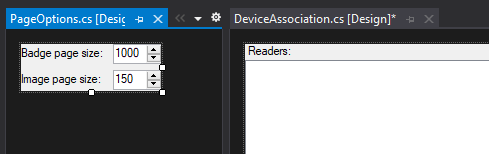

Visual Studio does support UI preview in the split mode - see below
No, it was actually about specific files which were not properly recognized. I was not trying to compare two files in the designer. I can't give additional information about this now, as I'm not working on any GUI projects at the moment. I don't even know if this would still be a problem in the more recent versions of rider, so i think this can be closed for now.