Azure TFVC binding never ending changelist "updating"

I've got a .net core 3.0 solution i'm working on in a Windows 10 environment. It has its own local workspace I've created for it in Azure TFVC. All the Rider settings for Version Control, Azure DevOps and TFVC look to be correct - I can see the the most recent checkin activity in the Repository window and view the diffs from there as well.
As I make changes to source code files, they get reflected in the "Local Changes" window however from the moment I start up Rider, the Local Changes window is in a never ending loop of "updating" changelists. It will say "updating" for a second then complete, then "updating" for a second then complete non stop. If i try to view a diff from a changelist by clicking on it, the diff window appears but once an "updating" cycle finishes the diff window refreshes and it's scrolled back to the top. This never ending loop of updating changelists causes the memory usage of rider64.exe to incrementally grow and after a few minutes I have to close the application.
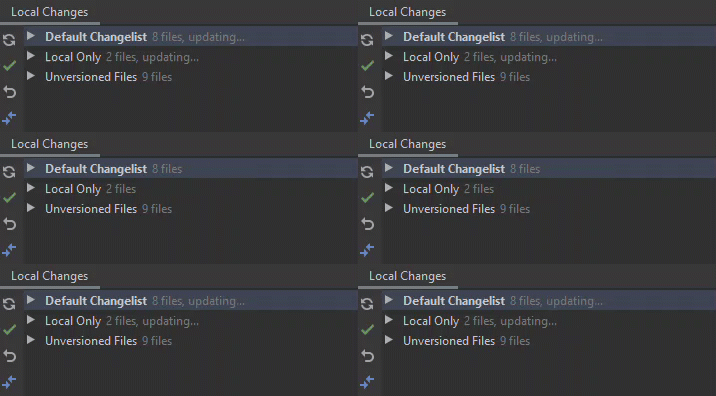
Any help would be great.
Please sign in to leave a comment.
Hi David,
Could you please clarify your Rider version, share a screenshot of "Preferences | Version Control | TFVC"?
Also, please clear idea.log file (one can find it via the menu "Help | Show Logs in ..."), reproduce the issue, then share idea.log with us with one way described here.
Besides, we need the information generated by the action "Help | Collect Troubleshooting information".
Thank you in advance!
Sofia
Hi, Sorry for not including it earlier I am running:
Rider Version 2019.3.1
Build #RD-193.5662.14, built on December 19, 2019
I HTTP uploaded the requested info, screenshots and logs of all the settings: DavidMolton_RiderLogs.zip
Thanks
Dave
Hi David,
Thank you for the information.
I've noticed your Azure DevOps plugin is a bit outdated (v1.156.0). Could you please try upgrading it (Preferences | Plugins) and check if the issue persists? I'm asking because we've fixed several similar issues.
Kind regards,
Sofia.
Thank you for the suggestion regarding the Azure DevOps Plugin.
I was not able to find any way to update this bundled in plugin from the IDE. The only options I was given for it was the ability to disable it. The /outdated flag on the search box returned "Nothing Found"
I ended up disabling the bundled Azure plugin, downloading the latest source code for it from https://github.com/microsoft/azure-devops-intellij/releases getting a JDK environment setup, building the plugin manually from source per their readme, and installing it into Rider from the "Install Plugin From Disk" option.
So far these steps looks to have solved most of the issues I've been seeing so far but I suppose from now on i will need to manually build and install all the updates for this plugin which is not ideal - unless I missed the correct way of updating the bundled version of the Azure plugin?
Thanks for the help
Hello, David, and thank you for letting us know about the problem. There really is something wrong with Azure DevOps updates for older versions of Rider, I've filed a separate issue about that.
For the time being, if you need to install any plugin update manually, you don't have to build the plugin package yourself. You could visit Azure DevOps plugin page on the plugin portal, download a newer verision of the plugin manually, and then install it via Install from Disk option.