Solution Wide Analysis Markers In Scrollbar

Hi guys,
When solution wide analysis is enabled, I can see it adds various markers to the scrollbar of the solution explorer.
However, the markers are confusing because, for example, if I expand my Views folder which is red underlined, markers will appears in the scrollbar next to sub items in the Views folder that aren't red underlined.
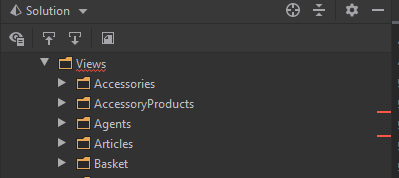
Also, if you then scroll up and down in the solution explorer, the markers stay fixed in the same position.
I kind of thought these markers were there to indicate which files / folders had errors. Unless the markers are there to signify something else? A little bit confused as to their purpose if someone could enlighten me please.
Thanks!
Please sign in to leave a comment.
Hi Andrew,
These markers are similar to the ones in the Editor. They reflect relative position of the element (file in this case), based on the visible area of the Solution Explorer. So the markers are not placed next to the target elements, they just reflect an approximate position of such element on the scrollbar.
For example, if you see a red mark around the middle of the scrollbar, you will find the corresponding file in the middle of the solution tree.
Please let me know if anything is unclear.
Hi Kirill,
Thanks for confirming that, it makes a bit more sense now.
Andrew