Javascript - don't put object initialisation braces on the same line if I've already hit enter

I want to initialise an empty object, having the closing brace on the next line. I type the opening brace, and just before type the closing brace:
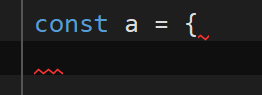
After typing the closing brace, it is automatically pulled up on to the previous line:
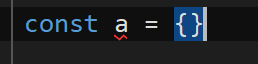
How do I disable this please? I have been unable to find a setting which affects it.
Many thanks
Please sign in to leave a comment.
Hi, Smimon.
You should open “File | Settings | Editor | General | Typing Assistance” settings page and disable “Auto-format on closing brace”. After, you can place the brackets anywhere.
I attached a short video of how it works.
https://recordit.co/OuOV99kMMr
Let me know if it helps.
Kind regard,
Maxim Isaev.
Thank you - whilst that works in this instance, I then lose the ability to have the IDE format mis-aligned code within braces when I want it to.
The same behaviour does not occur in C# - we have the "Empty braces formatting" which controls the behaviour. Is there an equivalent that will do what I want for Javascript, without disabling "auto-format on closing brace"?
Smimon, could you send me a code sample that is not formatted correctly and how it looks on your side?
Best regards,
Maxim Isaev.
Thank you for taking the time to respond to my queries. I've however decided to go back to Visual Studio, there are too many niggling frustrations with Rider at the moment for me to consider it for my main IDE.
Sorry to hear that. If you feel like giving Rider another try later, you can find the latest releases and description of new features here: https://www.jetbrains.com/rider/whatsnew/