Rider adds tab after auto completing method name

I updated rider recently and now whenever I auto complete a method name with tab or enter it adds a tab between the method name and the brackets. I havent changed any of my settings. Also after adding the semicolon to the end of the brackets it repositions correctly. This only seems to be in one project however. I cannot find for the life of me which setting does this or why it has changed. Any help is appreciated
What happens when pressing enter/tab to autocomplete: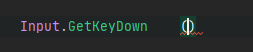
After adding the semicolon: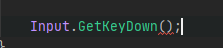
What I'd like when pressing enter/tab:
EDIT: There seem to be some other issues with tabing/entering into fields it replaces it with a discard (underscore). Only seems to a be problem with Unity's projects however.
Please sign in to leave a comment.
Good time of the day.
Thank you for this created request. I have a few questions.
1. What Rider version do you use? You can find this information on “Help | About” “JetBrains Rider | About” in case of macOS. Please try to install Rider EAP version from https://www.jetbrains.com/rider/nextversion/ or via Toolbox app and check if the issue appears in it.
2. Could you please try to clean caches. One can do it from the main menu “File | Invalidate Caches / Restart => Invalidate And Restart”. Can this help?
If the actions described above don’t help, please collect and share all Rider logs:
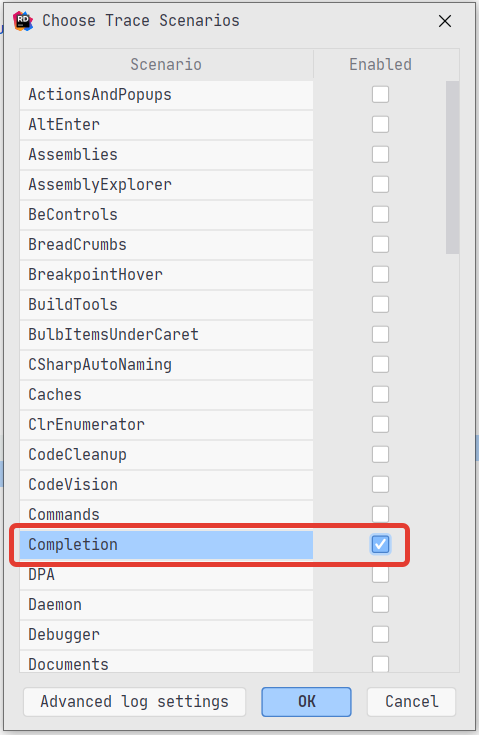
1. Find and select the item “Completion” in “Help | Diagnostic Tools | Choose Trace Scenarios”
2. Reproduce your issue.
3. Collect Rider log files by calling the action “Help => Collect Logs”.
4.Share logs using the service https://uploads.jetbrains.com/ and let me know id of the uploaded file(s).
Note. One can locate log files manually under the following path:
Windows: %LOCALAPPDATA%\JetBrains\Rider{version}\log
Mac: /Users/{User}/Library/Logs/JetBrains/Rider{version}
Linux: ~/.Cache/JetBrains/Rider{version}/log
Best regards,
Maxim Isaev.