Suggestion/Bug: Analyze if a property is an "expensive method"

The following applies to the latest version of Rider (2020.2.4) on Windows 10.
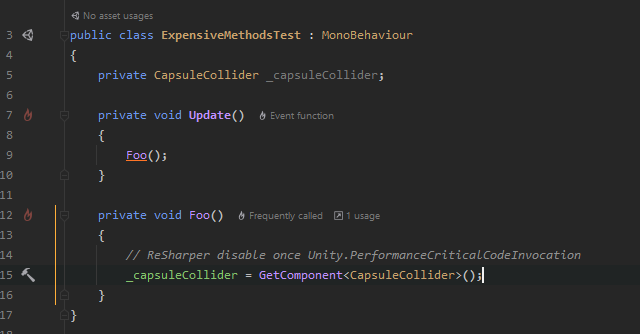
I've been trying to act on the the expensive method invocation hints Rider provides me but it's been difficult due to some sneaky hidden expensive method invocations in the form of properties. Here's a minimal example of what I'm talking about:

As you can see from this trivial example Rider provides no clear indication as to why Foo() is being considered an expensive method. In my experience I have had a difficult time playing "spot the property" hidden somewhere deep within a chain of method calls hundreds of LoC long. Additionally, it's worth noting that a property can not be marked with the ReSharper disable once Unity.PerformanceCriticalCodeInvocation comment, so I can't ignore the performance indicator without being forced to change the property (which is sometimes impossible).
Ideally C# properties could be treated in the same way as methods currently are, and could be given the same underline and ability to disable the inspection.
Edit: I forgot to mention that disabling the performance inspections in the property still doesn't fix the issue and the method calling the property will continue to be counted as expensive. Here's the updated example:
In fact this issue holds even for standard methods:
Please sign in to leave a comment.
Hello Jacob,
Foo is marked as frequently called because via getter with if there is GetComponent called. Rider uses static analysis, so it is not known how often it will be called in general. Another thing is that it does not mean that the code is bad, it is only an indicator which main goal is attracting you attention that you are writing in frequently called code.
Speaking about disabling this inspection, in Rider 20.3(EAP of which is available) you can disable it specifically for the method Foo.
Hope that helps.