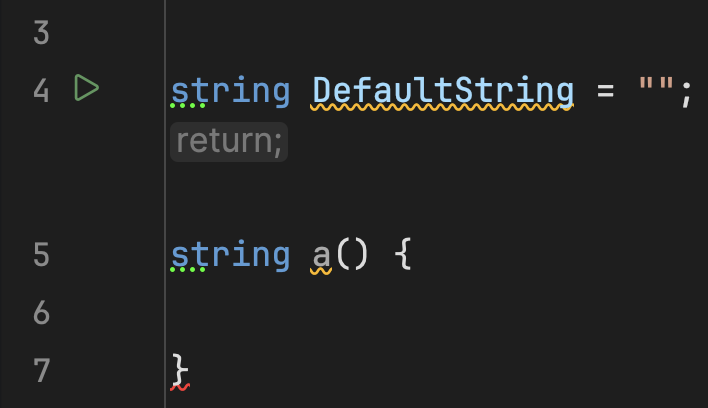
How do i disable the ghost return block

I feel like i have searched the entire settings menu but i cant find a way to disable this ghost return block that is shifting everything else down by 2 lines. i also cant use backspace in this text window for some reason and it keeps periodically dleting half my text . at this pooint ive spent 20 miniutes trying to type this and im just getting mad. so the spelling mistakes are because of the fact that i cant use backspace here
Please sign in to leave a comment.
Thanks for contacting Rider support.
Having local functions at the end of a code block is a common practice, but when reading such blocks, you often need to scroll past local function definitions to make sure there is no executable code after them. The “ghost” return block is one of Rider's inlay hints and can indicate to users that there is no executable code after this line.
To remove it, you can right-click on it , then change visibility to “Push-to-Hint” or “Never Show”.
It can also be configured under Settings | Editor | Inlay Hints | C# | Other | Implicit Control Folow Jump Hints.
See Inlay hints | JetBrains Rider Documentation for more information. Let me know if you have any questions.