Change connection of quert

Hello,
Is it possible to change database connection (datasource) of query? Currently i have to create new query window under other data source and copy query from original query editor. This is cumbersome.
Thanks for answer
Please sign in to leave a comment.
Hi Spingee,
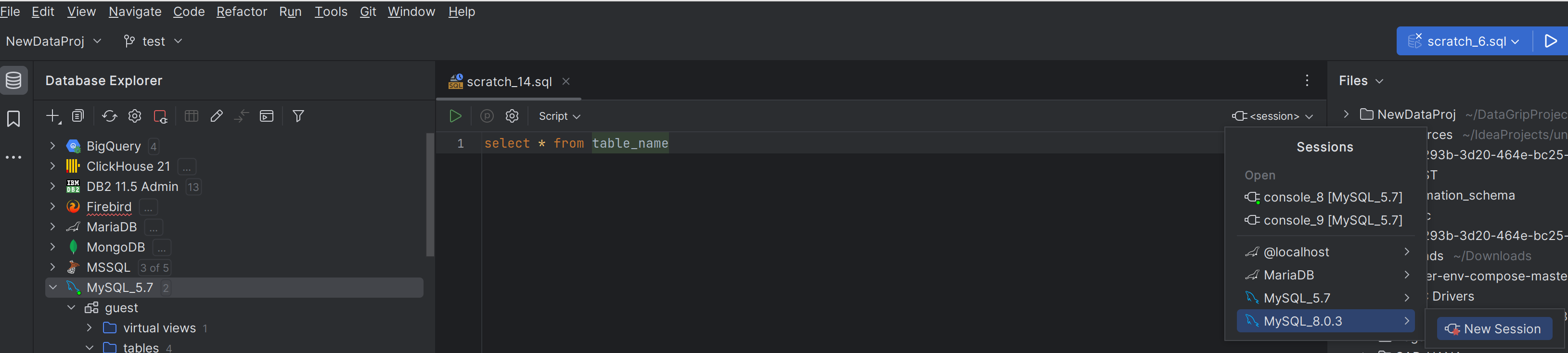
You can use SQL files for switching between data sources, based on the same SQL engine. To do so, you need to open a SQL file and change the session. You can either use an existing or create a new one from this section:
So its all about "Detach session" option which is not shown in ad hoc queries, otherwise everything is identical, is it possible to add detach session also to ad hoc queries?
Thanks for the update.
If you navigate to Service View and right-click on a File under current console connection, you can click Attach Session. From there, you can switch to a different console connection
I tried that too but i can change different data source. In screenshot i would like to switch to from console_7 to console_5 but i cant.
Also, on your screen, you are switching sql file, but i use "on the fly" query editor window.
By "on the fly query window" i mean query console opene from here
Unlike SQL Files, Console instances are strictly tightened to the data source, and there's no way you could switch between different consoles connected to different data sources. This is the concept of consoles, and we don't plan to change it.
Let me know if you have questions.