Caret Jumps Around Page, Inserts Text With Auto Complete

Hi there,
Sometimes when I try to insert an auto complete suggestion, the caret will jump to some position within the file (sometimes hundreds of lines further down) and insert some keyword, class name, or whatever. I am wondering if I maybe enabled some setting inadvertently or if its a bug. In any case, its very frustrating and effectively makes Rider unusable to me. The video below illustrates what happens:
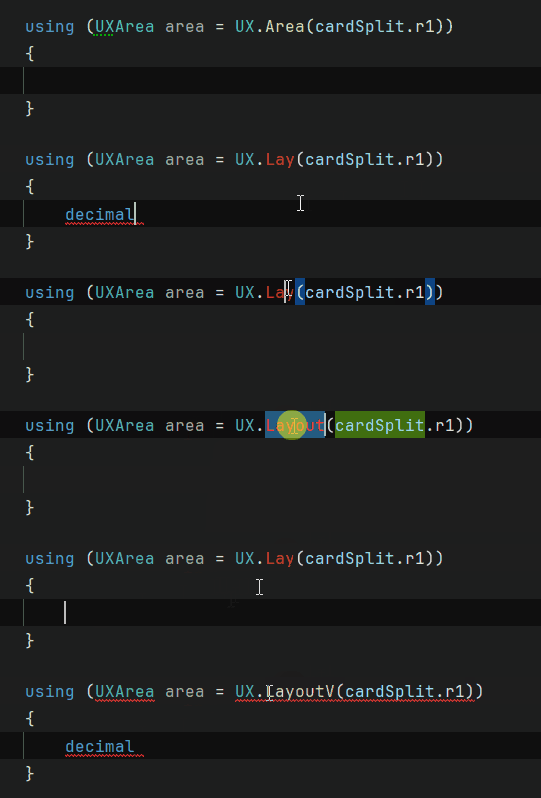
Whenever the caret jumps inside the curly braces and inserts some word (decimal, short, etc.) all I am doing is hitting enter. Changing using (UXArea area ...) to using (var area ...) doesn't make a difference, for what its worth. And as mentioned before, sometimes the caret jumps down hundreds of lines. It also seems to happen somewhat sporadically, and I'm not always able to reliably reproduce it. For instance, when I created that video, I copied that entire using block into another place within the file, and I wasn't able to reproduce the issue within that copied block. Sometimes I'll be writing for a few minutes or hours without issue before it starts happening.
This has happened before and invalidating the cache and resetting the IDE settings seems to fix it temporarily, but it's happening again and I'd like to know if this is a settings thing or a bug. I can't recall this happening with previous versions of Rider; it seems to have started after updating to 2025.2.
Thanks for any help!
Please sign in to leave a comment.
Justin Tendeck would you mind collecting Rider logs with additional diagnostic logging enabled so we could look into this further? Please follow these steps to collect the logs:
You can send us the logs via the Upload Service and let me know the Upload ID in this thread.
As a potential workaround, please try disabling Code With Me via Tools→Disable Code With Me and Restart and let me know if it helps.
Awesome. I updated to the latest version (2025.2.0.1) and disabled Code With Me and so far I haven't experienced the issue. I'll experiment with turning Code With Me off and on as I work and will let you know/share the diagnostic logs if it happens again. Thanks!
I experience the same issue several times a day. Autocomplete jump to a random location and inserts random keywords (mostly sbyte and decimal). Is there an issue on bug tracker for this?
IC Currently, we have several different reports for similar issues. However, for such issues, it'd be better to investigate them case by case. So it's recommended to raise a new ticket on our issue tracker for better tracking.
Thanks,
Tom
Hi I am also having this issue on 2025.2, incredibly frustrating. I have reproduced a few times and uploaded the logs Upload id: 2025_10_23_bWvrYZGEyhpy78xrP97UNR (file: rider-logs-20251024-09580813799224731652108118.zip)
I have attached your logs to this issue: RIDER-131289 Rider autocomplete jumps unexpectedly to a seemingly random location and outputs seemingly random word (decimal, sbyte keywords sometimes). You can upvote and subscribe to it for further updates.
Please let me know if this does not exactly match your issue.
Plus one on this. It seemed to go away for a while after I updated, but it's back with a vengeance. Happening to me multiple times in a row within a few minutes.
Smurphy-uk Does the workaround of disabling Code With Me work for you?
Your efforts to help us diagnose this issue are much appreciated.
Thanks,
Tom